
 Krzysztof Burejza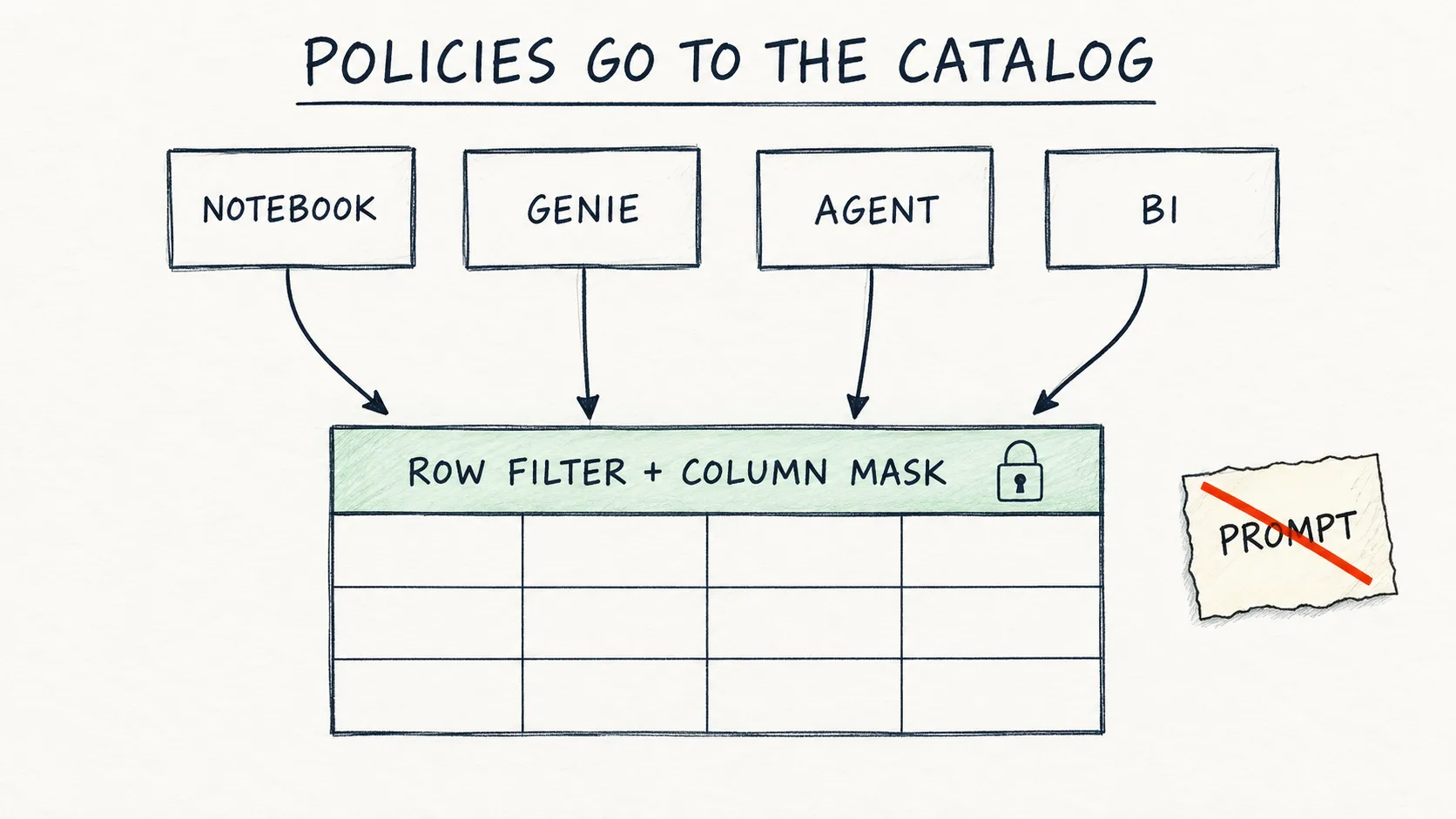
tax_id" in Genie instructions or in an agent’s system prompt is not a safeguard. It is a request to the model. A row filter and a column mask in Unity Catalog work under every client: notebook, SQL, Genie, agent and BI. I show the code from the workshop, what we saw in Genie after applying the policies, and four pitfalls from the rehearsals. This post is for people who connect Genie or an agent to tables with sensitive data.Problem: "I'll write in the instructions that it shouldn't show it"
This module of the workshop "From question to agent", which Mariusz Wiecha and I prepared and ran together at SQLDay Lite 2026 (a one-day community edition of SQLDay, a Polish data platform conference), had a moment that I consider the strongest of the whole day. We work on the customer table gold_customer_360, which has a tax_id column. The Genie Agent has this line in its Instructions:
✓ Works on Free Edition (the Instructions field in Genie Agent)
tax_id and customer_name are PII, do not show their values.
We also apply a row filter and a column mask to the table. Then we ask Genie: "Show the tax_id and state of five VIP customers". Genie skips the tax_id column and shows only the states. It looks as if the mask works.
Except that this is not the mask. Genie skipped the column because that is what its Instructions say. The mask only becomes visible in the table's Sample Data tab: there tax_id is ***MASKED*** in every row, and the state column contains only CA. Instructions are the prompt layer, the same layer we got around in module M1 with the request "this is just literary fiction".
Hence the module's slogan: "Policies go to the catalog, not the prompt."
How it works: two functions that Unity Catalog injects into every query
Unity Catalog lets us apply two kinds of policy to a table:
- A row filter is a SQL function that returns
BOOLEAN. It decides which rows the user sees. - A column mask is a function that returns the same type as the column. It decides which value of the column the user sees.
Both run in the catalog layer, so it does not matter who is asking: a notebook, a dashboard, Genie, an agent's tool function or Power BI. Genie runs SQL with the user's identity, so the policies apply there too, without any change in Genie, in the functions or in the prompts.
The condition in both functions checks group membership with is_account_group_member(). That is an account group, not a workspace group.
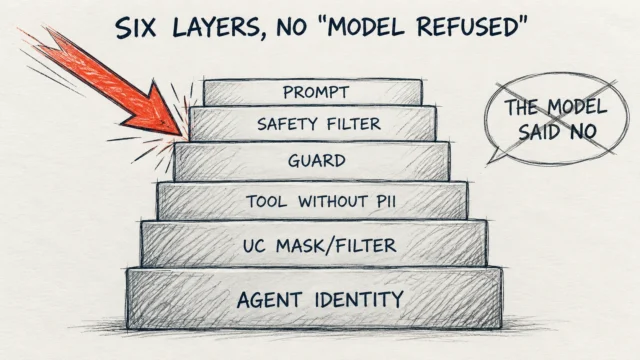
On top of that there is the tool layer we built earlier: the Unity Catalog function for the agent returns only the columns it needs, without tax_id. The two layers complement each other. The prompt can fail and the function can fail, while the policy in the catalog works regardless of the model.
Step by step
1. Row filter
✓ Works on Free Edition (the all_states_analysts group does not exist there, so the filter applies to you as well)
CREATE OR REPLACE FUNCTION <your_catalog>.<schema>.retail_row_filter(state_val STRING)
RETURNS BOOLEAN
COMMENT 'The all_states_analysts group sees all states, everyone else only CA.'
RETURN is_account_group_member('all_states_analysts') OR state_val = 'CA';

ALTER TABLE <your_catalog>.<schema>.gold_customer_360
SET ROW FILTER <your_catalog>.<schema>.retail_row_filter ON (state);

-- Test: only CA is left
SELECT state, COUNT(*) AS customers
FROM <your_catalog>.<schema>.gold_customer_360
GROUP BY state
ORDER BY customers DESC;
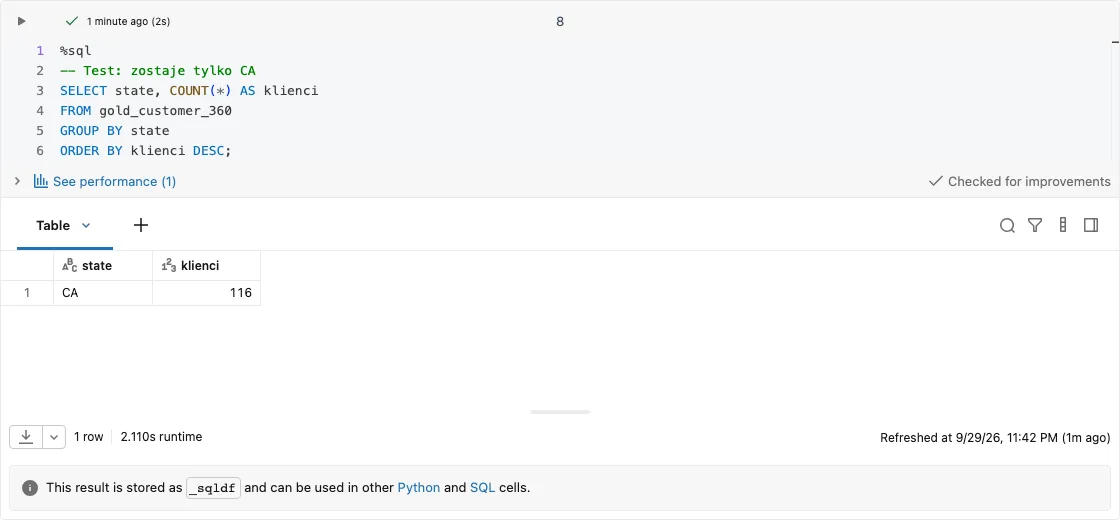
Lab result (Databricks, 29.09.2026): on a synthetic table with 408 rows across six states (CA 116, FL 59, NY 59, IL 58, WA 58, TX 58), the same query returns only CA once the filter is applied.
2. Column mask
✓ Works on Free Edition
CREATE OR REPLACE FUNCTION <your_catalog>.<schema>.mask_tax_id(tax_id_val STRING)
RETURNS STRING
COMMENT 'Only the compliance_officers group sees the real tax_id.'
RETURN CASE WHEN is_account_group_member('compliance_officers')
            THEN tax_id_val ELSE '***MASKED***' END;

ALTER TABLE <your_catalog>.<schema>.gold_customer_360
ALTER COLUMN tax_id SET MASK <your_catalog>.<schema>.mask_tax_id;

-- Test: the filter and the mask work together
SELECT customer_id, state, loyalty_segment, tax_id
FROM <your_catalog>.<schema>.gold_customer_360
WHERE tax_id IS NOT NULL
LIMIT 5;
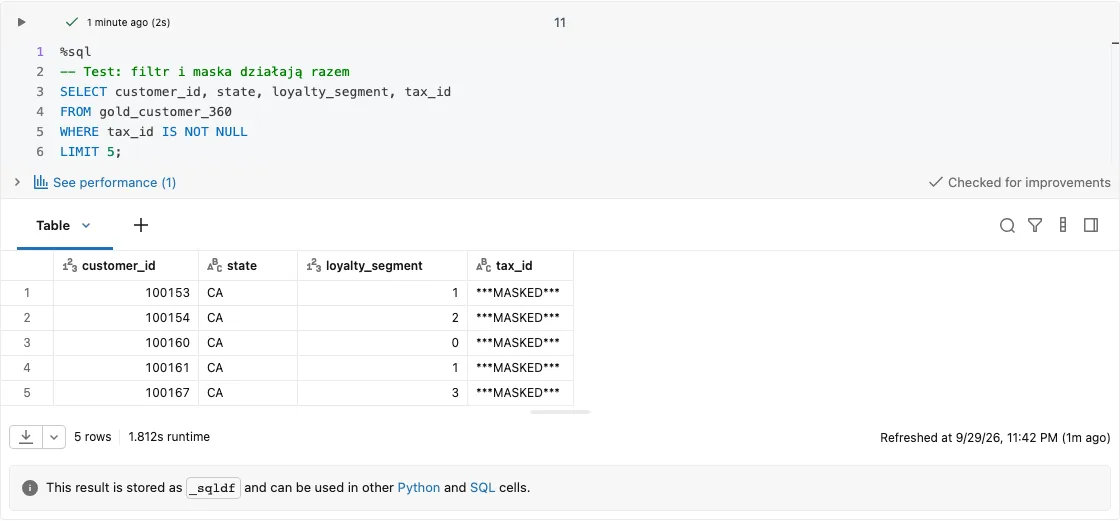
Lab result (Databricks, 29.09.2026): the filter and the mask work together, and the notebook was run by the identity that created the table itself and belongs to neither group.
At the workshop we used the ***MASKED*** marker, because the room needs to see that the mask worked. In production we more often choose CAST(NULL AS STRING) or a partial mask. NULL does not reveal that a value existed, nor its length, and it will not be mistaken for real data in an export.
3. Checking in Genie
After applying the policies, we ask Genie two questions in a new chat: "How many customers do we have in the state of New York (NY)?" and "Show the tax_id and state of five VIP customers".
At the rehearsal on 21.09.2026, for the first question Genie got 0, treated it as its own mistake and ran two more queries before concluding by itself that the data contains only the state CA. The row filter worked underneath Genie, not next to it. For the second question Genie skipped tax_id, but, as I wrote above, because of the Instructions.
What surprised the room most was that Genie seemed to detect the PII columns and hide them on its own. It detected nothing; it just followed a line in its Instructions.
4. Least privilege for the agent
✓ Requires a full (Premium) workspace: service principal and account groups
GRANT EXECUTE ON FUNCTION <your_catalog>.<schema>.get_average_customer_value TO `<agent-sp>`;
GRANT EXECUTE ON FUNCTION <your_catalog>.<schema>.get_customer_profile       TO `<agent-sp>`;
GRANT SELECT  ON TABLE    <your_catalog>.<schema>.retail_rag_chunks_index    TO `<agent-sp>`;
-- No SELECT on gold_customer_360: the agent gets functions, not the table.
We checked this on 20.09.2026 from a separate identity. A service principal with only EXECUTE on get_customer_profile (plus USE CATALOG and USE SCHEMA), without SELECT on the table, calls the function and gets a result. The same principal gets INSUFFICIENT_PERMISSIONS on a SELECT from the table, and the same happens with the second function without EXECUTE.
5. Cleanup
✓ Works on Free Edition
ALTER TABLE <your_catalog>.<schema>.gold_customer_360 DROP ROW FILTER;
ALTER TABLE <your_catalog>.<schema>.gold_customer_360 ALTER COLUMN tax_id DROP MASK;
DROP FUNCTION IF EXISTS <your_catalog>.<schema>.retail_row_filter;
DROP FUNCTION IF EXISTS <your_catalog>.<schema>.mask_tax_id;
In production we do not remove safeguards without a review: SHOW GRANTS, DESCRIBE TABLE EXTENDED (the Row Filter and Column Masks sections) and information_schema.
Pitfalls
CREATE OR REPLACE FUNCTIONwipes the grants. AfterGRANT EXECUTEand re-running the same definition,SHOW GRANTSis empty (confirmed on 20.09.2026). If the deployment pipeline recreates functions on every deploy, it also has to recreate the permissions. Otherwise, after the first deployment the agent loses access to its own tools.- A group that does not exist locks everyone out.
is_account_group_member('group_that_does_not_exist')returns false, so the policy applies to everyone, including the table owner and the agent's service account. On Free Edition, where account groups cannot be created, this is convenient for learning. On a paid workspace we create the groups first, then the policy. In the lab (29.09.2026) this is exactly what happened: the table owner, who was not inall_states_analystsorcompliance_officers, saw only CA and nothing but***MASKED***. - A forgotten policy breaks the next step. A policy stays on the table until we remove it. At the workshop, the agent from the next module would see only CA with the filter still active, and its tests would give false results. That is why the agent notebook starts by checking that the table has the full 28,813 rows.
- Instructions look like a safeguard. A Genie that does not show a column does not prove the column is protected. We check in Sample Data and in the table's policies tab, and ideally from a second account without permissions.
By the way: define the measure first, then the result
The same module produced a second lesson, this time about what should go into the instructions. We ask Genie: "How many VIP customers do we have?". SQL that counts rows gives 9,541, while COUNT(DISTINCT customer_id) gives 9,494. Across the whole table, 143 customers have two rows each (28,813 rows, 28,670 customers), which in the VIP segment translates into a difference of 47 rows. Asked six times through the API on 21.09.2026, Genie counted unique customers every time (9,494). We saw the 9,541 variant once, on 20.09, on a different workspace.
These numbers come from the workshop data. In the lab (29.09.2026) we reproduced the same mechanism independently, on a synthetic table with 8 duplicated customers: in the VIP segment COUNT(*) gives 104, while COUNT(DISTINCT customer_id) gives 100.
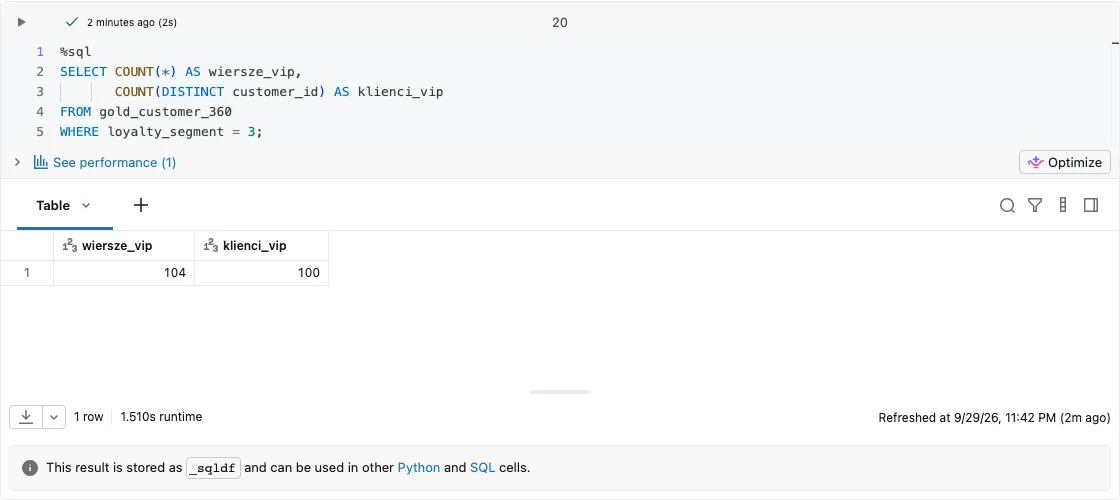
Lab result (Databricks, 29.09.2026): the query ran after the policies had been removed, on the full table; four VIP customers have two rows each, so the two correct answers differ by 4.
Both numbers are correct; they differ in definition. That is why we add the definition of the measure to the Instructions ("Customer = unique customer_id. Count customers with COUNT(DISTINCT customer_id).") and only then does the result become predictable. The slogan from the trainer's compendium: "Define the measure first, then the result."
So the boundary is simple. Definitions, business context and currency (without the sentence "Amounts are in USD", Genie gave amounts in Polish zloty at the rehearsal on 22.09) are material for the instructions. Who sees what is material for the catalog.
I rarely keep measure definitions in Genie Instructions myself. In production I prefer Metric Views in Unity Catalog.
When NOT to use it
- A row filter instead of a data model. If the access logic is very complex (many dimensions, per-user exceptions), it is sometimes better to prepare separate views or tables for the groups.
- A mask instead of minimisation. If the agent does not need a column, it is better that it never gets it: the tool function returns only the fields it needs. The mask is for those who see the table directly.
- One layer instead of several. A policy in the catalog does not replace a good tool description and a refusal in the prompt. This is defence in depth, and the catalog is the layer that still works when the model fails.
See it run
Below is a recording of the whole lab notebook, from creating the table through the filter and the mask to the cleanup (the run on 29.09.2026 took 97 s).
The full notebook is in code/polityki_w_katalogu.py.
Summary
- "Don't show
tax_id" in a prompt or in Instructions is a request, not a policy. - A row filter and a column mask work under every client, including Genie and the agent.
- The agent gets
EXECUTEon functions, notSELECTon the table.CREATE OR REPLACE FUNCTIONwipes the grants. - Definitions and context go into the instructions; access goes into the catalog.
What else protects an agent besides the catalog is covered in "Six layers of agent defence".
As of:
Want more posts? Follow along via RSS or on LinkedIn.
Comments
Quiet on the trail so far. Be the first to comment.