
 Krzysztof Burejza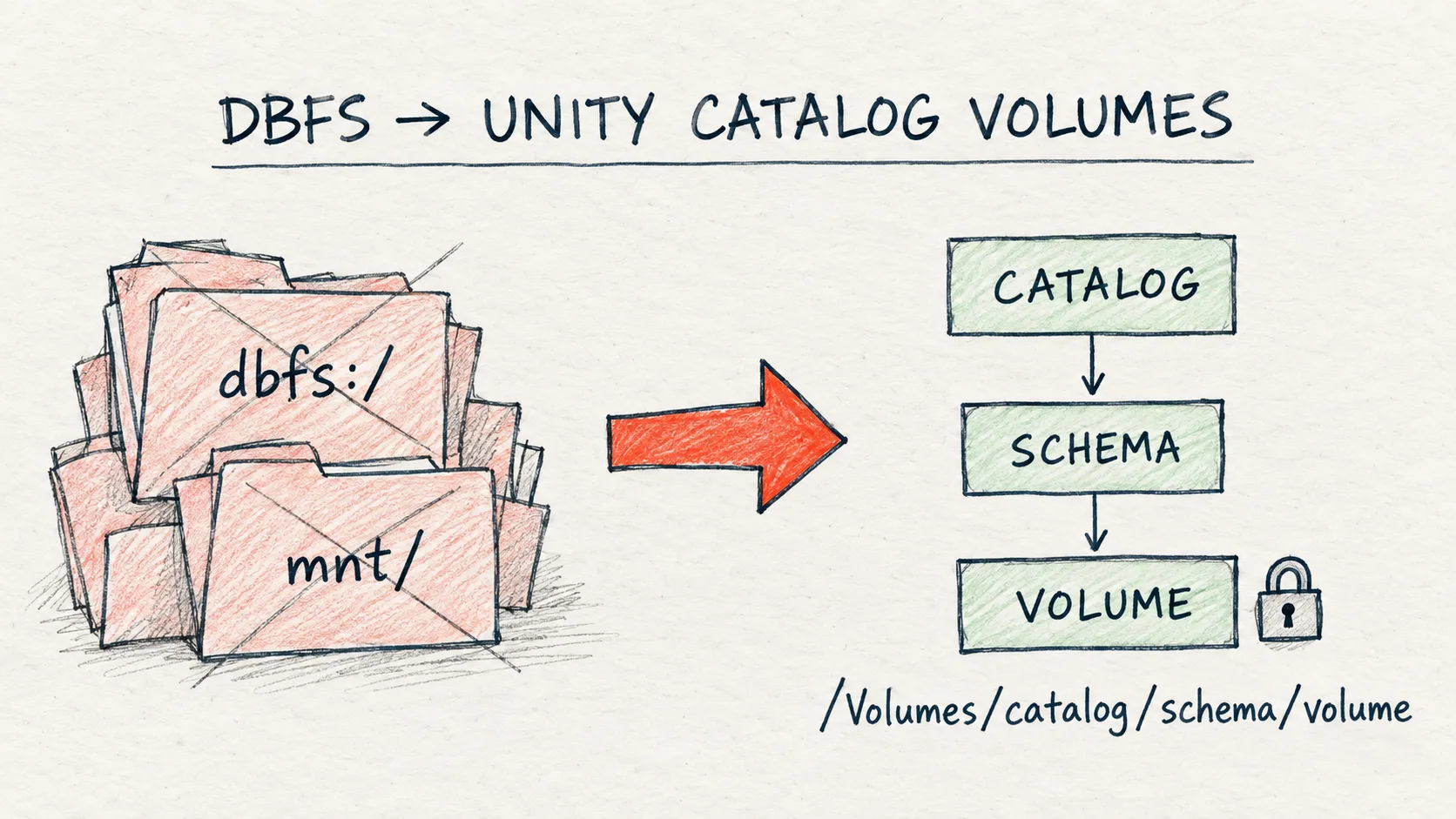
dbfs:/ path.Problem
I very often see code from tutorials and older projects where everything lives in dbfs:/FileStore/... or in /mnt/.... On a workspace that runs in legacy mode, that code still works. On a new workspace it does not, because those paths are simply not there.
I see this often, also at clients, because many systems are still legacy. AI adds to it: coding assistants still suggest dbfs:/ and /mnt/ paths, even though that's no longer good practice.
DBFS (Databricks File System) is a virtual file system on top of cloud storage. The problem with it is the lack of governance: every workspace user sees everything in the DBFS root, and a mount with a storage key gives access to anyone who knows the path. Unity Catalog solves this with Volumes, which are files with permissions, auditing and lineage.
Let me correct one thing right away, because a simplified version is going around online: on September 30, 2026 Databricks does not switch off DBFS everywhere. What changes is how new workspaces are created.
What exactly changes
| Situation | DBFS root / mounts / Hive Metastore |
|---|---|
| Azure Databricks account created after 2025-12-18 | Not available from the start |
| New workspace from 2026-09-30 (in any account, including older ones) | Not available |
| Existing workspace | Works as before, migration is recommended |
In the lab (2026-09-29) we could see this live: the trial workspace we created on 2026-09-29, one day before the deadline, has hive_metastore as its default catalog. So it still has the legacy features. A workspace created from September 30 would not.
New workspaces will not have four things:
- the DBFS root and mounts (
dbutils.fs.mount,/mnt/...), - Hive Metastore (
hive_metastoreas a catalog), - clusters in no-isolation shared mode,
- Databricks Runtime older than 13.3 LTS.
For us, this means a "UC-only" workspace becomes the standard. If our code, init scripts or automation assume any of these things exist, something will break in the next new environment.
Volumes instead of DBFS
A volume is a Unity Catalog object for files (CSV, JSON, images, models, libraries). Its path looks like /Volumes/<catalog>/<schema>/<volume>, and it follows the same rules as tables: it has an owner, and we grant access with READ VOLUME and WRITE VOLUME.
| DBFS (legacy) | Volume in Unity Catalog | |
|---|---|---|
| Path | dbfs:/..., dbfs:/mnt/... |
/Volumes/catalog/schema/volume |
| Governance | None, every workspace user sees everything | UC permissions, auditing, lineage |
| New workspaces | Not available | Default |
| Status | Deprecated | Recommended |
We start by creating a volume. Works on Free Edition:
CREATE VOLUME IF NOT EXISTS <your_catalog>.default.landing
COMMENT 'Manually uploaded files';
We can upload a file through Catalog Explorer: Catalog → our catalog → default → landing → Upload to this volume. Alternatively: New → Add or upload data → Upload files to a volume.
Then we read it with a regular path, with no mount and no storage key. Works on Free Edition:
LANDING_PATH = "/Volumes/<your_catalog>/default/landing"

# What is in the volume? (same as LIST '/Volumes/...' in SQL)
for f in dbutils.fs.ls(LANDING_PATH):
    print(f"{f.name:<20} {f.size:>8,} bytes")

display(spark.sql(f"""
    SELECT *
    FROM read_files('{LANDING_PATH}/stores.csv', format => 'csv', header => true)
    LIMIT 5
"""))
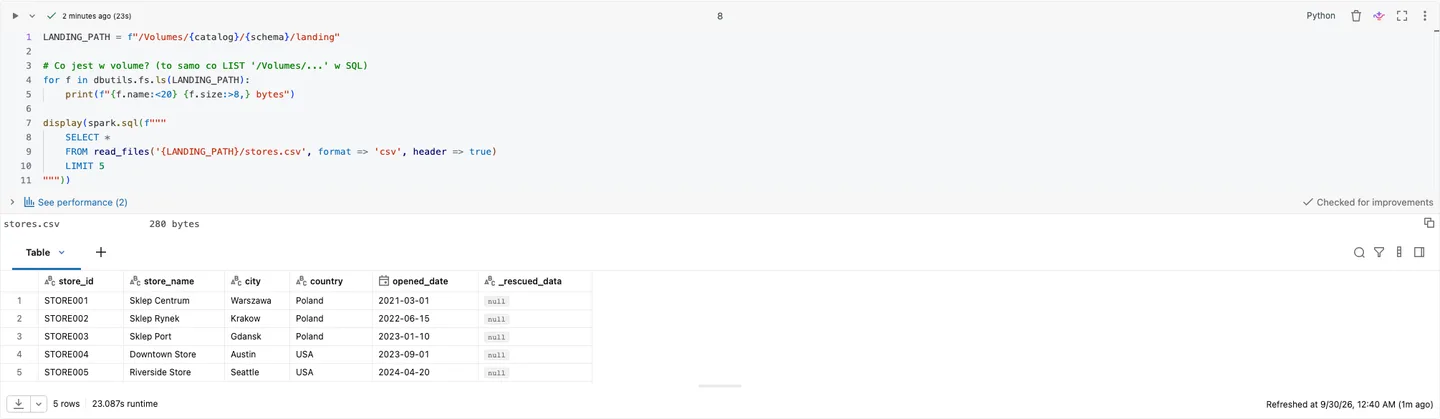
Lab result (Databricks, 29.09.2026): we list and read the volume with a plain /Volumes/... path, and read_files() adds a _rescued_data column for values that do not match the schema.
A volume is a Unity Catalog object, so we can describe it just like a table. Works on Free Edition:
SHOW VOLUMES IN <your_catalog>.default;
DESCRIBE VOLUME <your_catalog>.default.landing;
One thing people ask about most often: a file in a volume is not a table. read_files() and spark.read read it again with every query. If we want to work with the data as a table, we load it into Delta, for example with CREATE TABLE ... AS SELECT * FROM read_files(...) or with Auto Loader.
Migration checklist: where to start
- We look for old paths in the repo, notebooks and job configuration:
dbfs:/,/dbfs/,/mnt/,dbutils.fs.mount,%fs,FileStore. A plaingrep -rE "dbfs:/|/dbfs/|/mnt/|dbutils.fs.mount|FileStore"over the repository gives us a first list. - Init scripts and libraries stored on DBFS move to Volumes or to workspace files.
- Mounts with storage keys are replaced by a Storage Credential + External Location. We grant access with grants, not by knowing the path.
- Hive Metastore tables move to Unity Catalog (
SYNC, UCX or HMS federation). That is a topic for a separate article; here we only need the list of tables to move. - No-isolation shared clusters are replaced with the Standard or Dedicated access modes, and Databricks Runtime is upgraded to at least 13.3 LTS.
- Workspace creation automation (Terraform, CI/CD): we remove dependencies on DBFS and Hive Metastore and set up automatic metastore assignment (auto-assign) in every region where we create workspaces.
- Test before the deadline: in the account console we turn on the Disable legacy features setting. This lets us check the "new workspace" behavior before the calendar date does it for us.
Pitfalls: when migration gets complicated
- Pandas and local APIs reading
/dbfs/.... Code likepd.read_csv("/dbfs/FileStore/...")has to be rewritten to use a/Volumes/...path. In the lab (2026-09-29),pd.read_csv("/Volumes/.../landing/stores.csv")read the file directly (5 rows), with no prefix and nospark.read.

Lab result (Databricks, 29.09.2026): once the /dbfs/... path is replaced with /Volumes/..., pandas reads the file with no extra configuration.
- Paths hardcoded in libraries and configs. A grep over the repository is not enough if the path sits in job parameters, cluster environment variables or the configuration of an external tool. It also helps to review job definitions and run history.
- Mounts that give access to "everyone". After moving to an External Location, we suddenly need grants for specific groups. This is a good change, but it needs planning, otherwise on the first day after migration we get a series of
PERMISSION_DENIEDerrors. - Metastore on Azure. In our Terraform for test environments we do not create a metastore manually, because on Azure it is created automatically per region. If our automation tries to create one or assumes it does not exist, this needs to be cleaned up for new workspaces.
- Jobs on no-isolation shared clusters. After moving to a new workspace, such a job will not start, because that access mode simply does not exist there.
When NOT to panic
An existing workspace keeps working. If we are not creating new workspaces in the near future, we have time for a calm migration. It is worth planning it now, though, and not on the day someone sets up a new environment for a new team or project and it turns out that half of the notebooks point to /mnt/.
Not every file has to go to a volume right away. If something is just a one-off experiment on an old workspace, it is enough not to carry it forward.
See it run
The recording shows the whole notebook run in the lab on 2026-09-29: from creating the volume, through reading the file, to cleanup (83 s, all cells OK).
The full notebook is in the code/ folder (dbfs_volumes.py).
Summary
- From 2026-09-30, new workspaces are created without the DBFS root, mounts, Hive Metastore, no-isolation shared clusters and DBR < 13.3 LTS. Azure accounts created after 2025-12-18 never had them.
- Existing workspaces are not affected, but code using
dbfs:/will not carry over to a new environment. - The first step is a grep for
dbfs:/,/dbfs/,/mnt/and moving files to Volumes. - Before the deadline we test the Disable legacy features setting and set up metastore auto-assign in every region.
As of:
Want more posts? Follow along via RSS or on LinkedIn.
Comments
Quiet on the trail so far. Be the first to comment.