
 Krzysztof Burejza
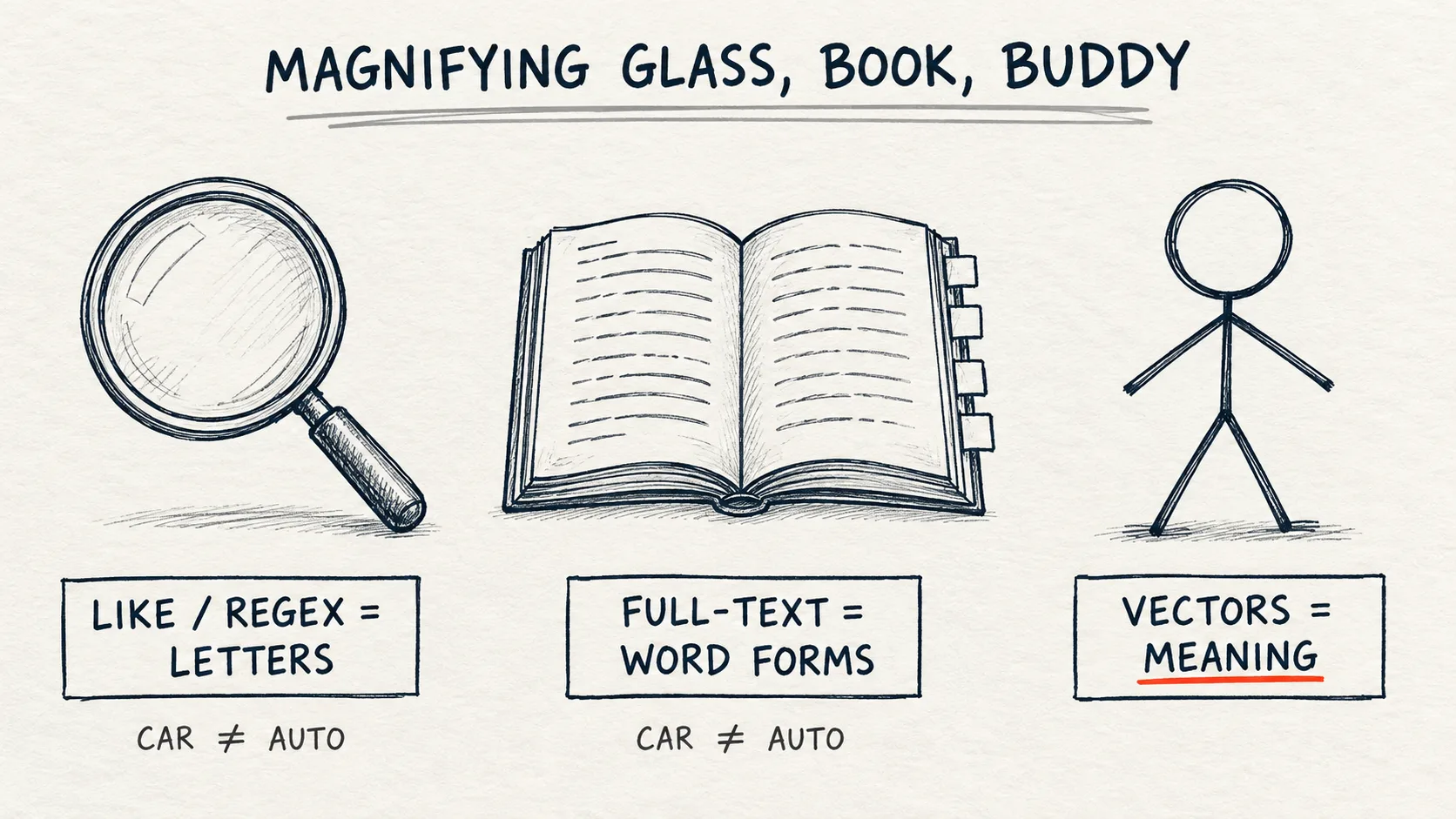
LIKE and regex look at letters, full-text search knows word forms, and vector search compares meaning. On 12 short articles about coffee, the query ILIKE '%parzyć%' finds nothing, because the texts only contain "parzenie", "parzenia" and "parzona" (other forms of "brew"). The isearch function matches whole words, but also only in one form, and only comparing meaning (ai_similarity) pulls the barista articles into the results, though not all of them and not always to the top. This post is for people who write WHERE every day and want to know when a magnifying glass is enough and when you need to call a buddy.Problem
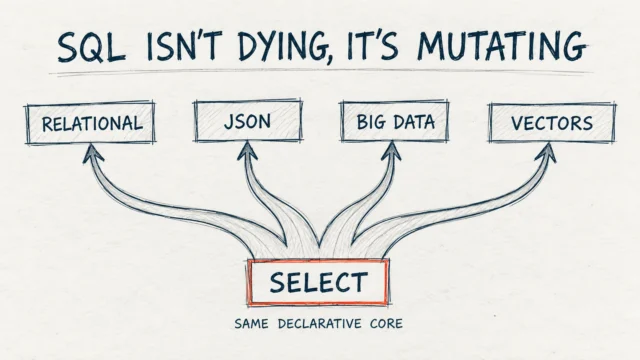
In "SQL isn't dying, it's mutating" I wrote about how SQL is changing. Text search shows this best, because that is where most has changed in recent years.
The example from my talks: we have a database of 60 articles about coffee, written in Polish. Four of them (IDs 1–4) are texts for a professional barista: pressure profiling, water chemistry, coffee distribution in the portafilter, refractometer and extraction yield. The other 56 are noise: coffee history, recipes, growing regions. The barista types a question: "Jak prawidłowo parzyć kawę?" ("How do I brew coffee properly?").
The titles of the articles they are looking for read, for example, "Advanced extraction: pressure profiling and flow control". None of them contains "brew" or "coffee" in the form used in the question. A human sees immediately that it is about the same thing. The SQL query doesn't.
A correction to myself: on the "Failure in practice" slide I showed results like "247 articles, most of them irrelevant". Those were illustrative numbers, and the demo set had 60 rows. Below I show the same problem on Databricks, on 12 synthetic articles, with results from the lab.
How it works
In my talk on SQL and AI I used an analogy that worked better in the room than any definition. We are looking for information about "combustion vehicles".
- LIKE and regex are a magnifying glass. We look at every letter. We find "vehicle", but not "car", "auto" or "automobile". We see characters, not meaning.
- Full-text is a book with an index. We have an alphabetical index that knows word forms, so we find "vehicle" and "vehicles". But "car" is a different entry in the index. We have to know what to look for.
- Vectors are a buddy who gets it. We say "something about those four wheels with an engine", and the buddy answers: "Ah, you mean cars." They understand the intent, even if we use different words.
The first two are syntactic search, the third is semantic search.
| Method | How it works | Pros | Cons | When |
|---|---|---|---|---|
| LIKE | pattern match %...% |
simple, no setup | literal, a leading % rules out a range seek on a plain B-tree index |
filters on small tables |
| Regex | patterns, e.g. ^[A-Z]{2}\d{4}$ |
precision | easy to get wrong, slow | validation, codes, e-mails |
| Full-text | index, stemming, ranking | fast, knows word forms | synonyms only through a thesaurus you have to configure and maintain | keyword search engines |
| Vectors | embeddings and nearest neighbours | understands meaning and synonyms | needs a model and resources | search by intent |
Step by step
The queries stay in Polish, exactly as in the demo, because the data is Polish. That is part of the lesson: Polish inflection makes the magnifying glass even weaker.
Magnifying glass: LIKE
We can check the magnifying glass on Databricks in SQL with no setup at all. The notebook for this post (magnifying_glass_book_buddy.sql) doesn't need any files: it generates 12 short synthetic coffee articles, where IDs 1–4 are again texts for a professional barista and the other 8 are noise. The first cells of the notebook set the widgets, run USE catalog.schema and create the coffee_articles table with 12 rows. Without them the queries below return TABLE_OR_VIEW_NOT_FOUND.
✓ Tested on Free Edition (2026-10-17)
SELECT id, title
FROM coffee_articles
WHERE body ILIKE '%parzyć%' OR title ILIKE '%parzyć%';
LIKE compares text with a pattern, and % means any string of characters. ILIKE is LIKE that ignores case. The query looks for "parzyć" in the body or the title and returns 0 rows, just like the full pattern '%jak%prawidłowo%parzyć%kawę%'. The bodies contain "parzenie", "parzenia" and "parzona" (other forms of "brew"), but not "parzyć". Inflection of the word "kawa" (coffee) hurts the same way: title ILIKE '%kawa%' matches 1 title out of 12, and title RLIKE '(?i)kaw(a|y|ę|owe)', a regex with a list of word forms, matches 4.
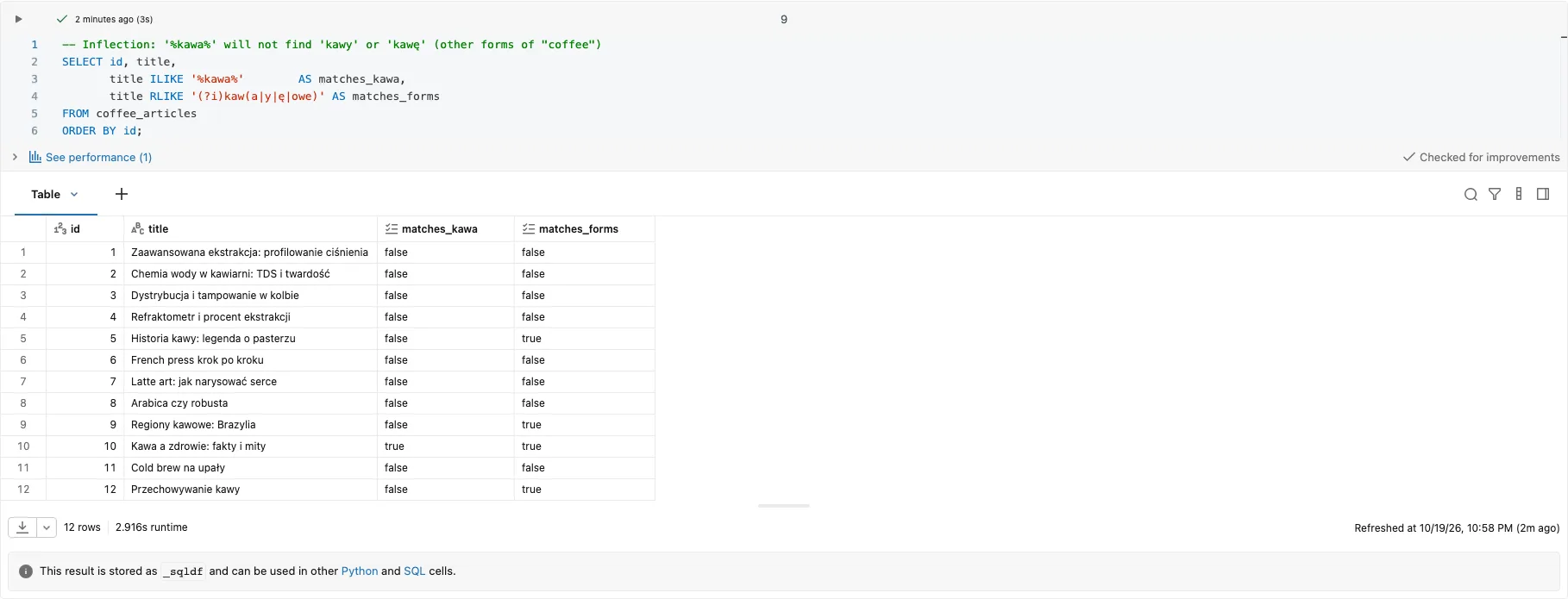
Lab result: none of the barista articles (IDs 1–4) has "coffee" in its title in any form.
A better lens: regex
Regex lets us search for whole words and lists of variants:
✓ Tested on Free Edition (2026-10-17)
SELECT id, title,
       regexp_extract(body, '(?i)(espresso|aeropress|french press|chemex|v60|moka)', 1) AS first_method
FROM coffee_articles
WHERE body RLIKE '(?i)(espresso|aeropress|french press|chemex|v60|moka)';
(?i) at the start of the pattern turns off case sensitivity, and | means "or". RLIKE in WHERE keeps the rows where any of the brewing methods matches, and regexp_extract with group number 1 shows which variant matched first. The result is 5 articles: in four of them the first match is "espresso", in one "French press".
My talk demo script also had a pattern that looked reasonable and matched everything: (jak|prawidlowo|parzyc|kawe|). The last | before the closing bracket adds an empty alternative, and the empty string matches any text.
On Databricks we check this pattern with RLIKE. In the notebook we count it with count_if, which counts the rows that meet a condition: on the 12 synthetic articles the pattern with the empty alternative matches 12 of 12 rows, and without it 0. The bodies of these short articles don't contain any of those four words spelled without Polish diacritics, so without the empty alternative the pattern matches nothing.
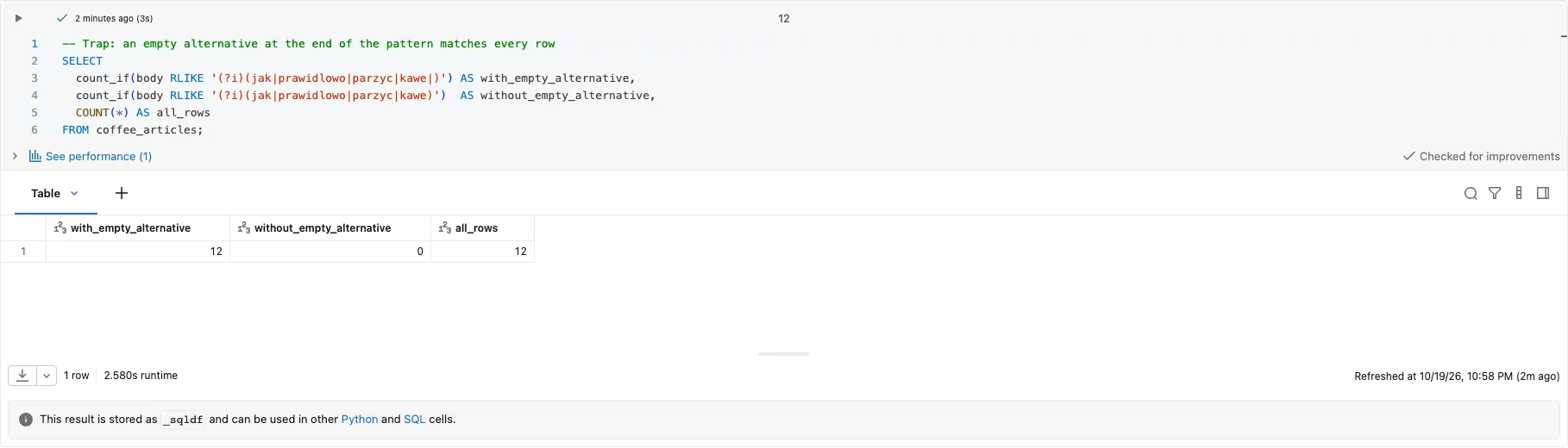
Lab result: count_if for both patterns; Databricks reports no error and no warning.
Book: full-text search
In classic databases the "book" is a full-text index: it splits text into words, knows their forms and gives a relevance ranking.
Databricks SQL has no such index with inflection and ranking. It has the search (case-sensitive) and isearch (case-insensitive) functions, in Beta, from DBR 19.0. They match a substring or, with mode => 'word', a whole word:
✓ Tested on Free Edition (2026-10-17)
SELECT id, title
FROM coffee_articles
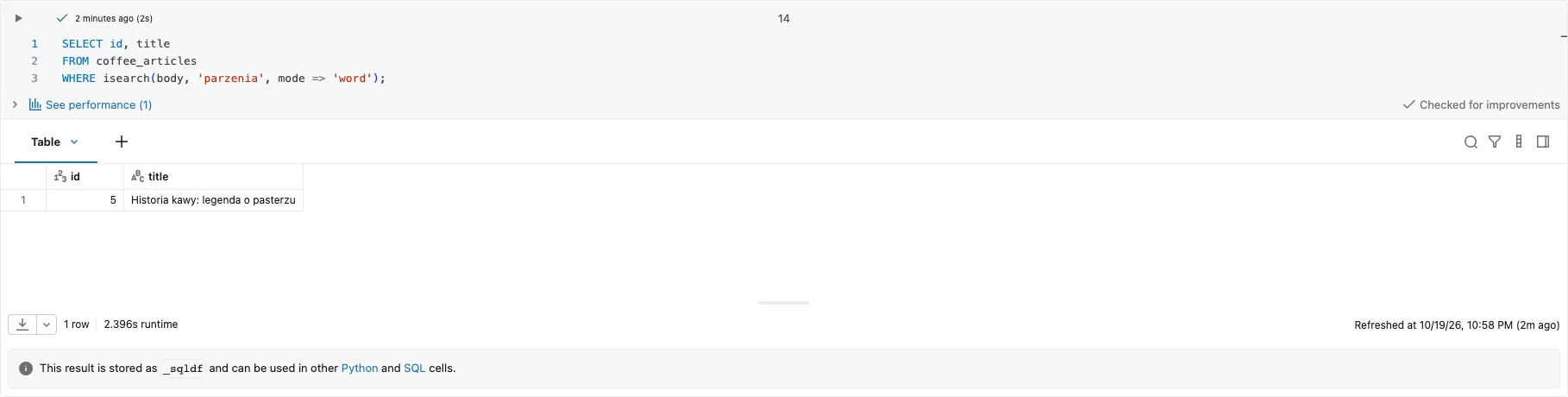
WHERE isearch(body, 'parzenia', mode => 'word');
The query returns one row, "Historia kawy" (coffee history, ID 5), because only there does the word "parzenia" appear. The water chemistry article has "parzenie" and the cold brew one "parzona", so they are missing: the function knows whole words, but not their forms, and it gives no ranking. Without mode => 'word' it looks for a substring, so isearch(body, 'parz') matches all three. isearch worked for us on serverless and on a Serverless SQL warehouse, even though the toggle for CREATE SEARCH INDEX on the Previews page is off.
On top of these functions there is CREATE SEARCH INDEX (Beta, DBR 18.3+; the docs checked on 16 Oct 2026 still said 18.2+), but it is an accelerator, not a search engine: it doesn't change results, it only skips files that can't contain the pattern. A workspace admin has to turn this index on on the Previews page first, separately in each workspace, so with dev, test and prod we do it three times. Turning on the preview isn't enough: the table must be managed and have row tracking and predictive optimization enabled. With masks, row filters or ABAC Databricks ignores the index: the query still works, just without the speed-up. Mind the contradiction with the tip in "Pitfalls": an indexed STRING column has to use the UTF8_BINARY collation, so if we switch the column to UNICODE_CI_AI to match without diacritics, we lose the option of indexing it. For us, with the toggle off, CREATE SEARCH INDEX fails with [INVALID_STATEMENT_OR_CLAUSE] The statement or clause: CREATE SEARCH INDEX is not valid. Fuller full-text search comes from AI Search in FULL_TEXT (Beta, also through Previews) or HYBRID mode, but AI Search's automatic language detection does not cover Polish. Also, the vector_search() SQL function only accepts ANN and HYBRID: query_type => 'FULL_TEXT' fails with [AI_SEARCH_QUERY_TYPE_UNSUPPORTED_ERROR] ... Please specify one from: [ANN, HYBRID].
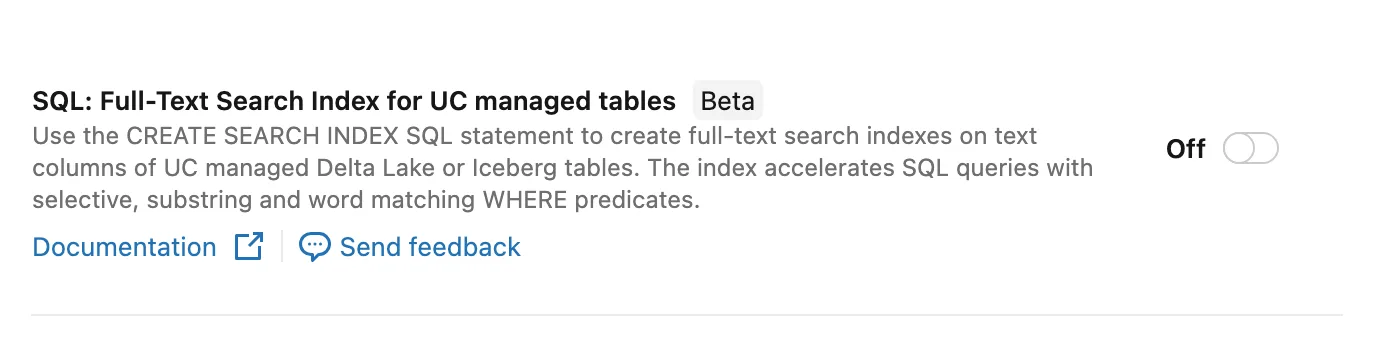
Workspace Previews page (2026-10-14): CREATE SEARCH INDEX is off by default.
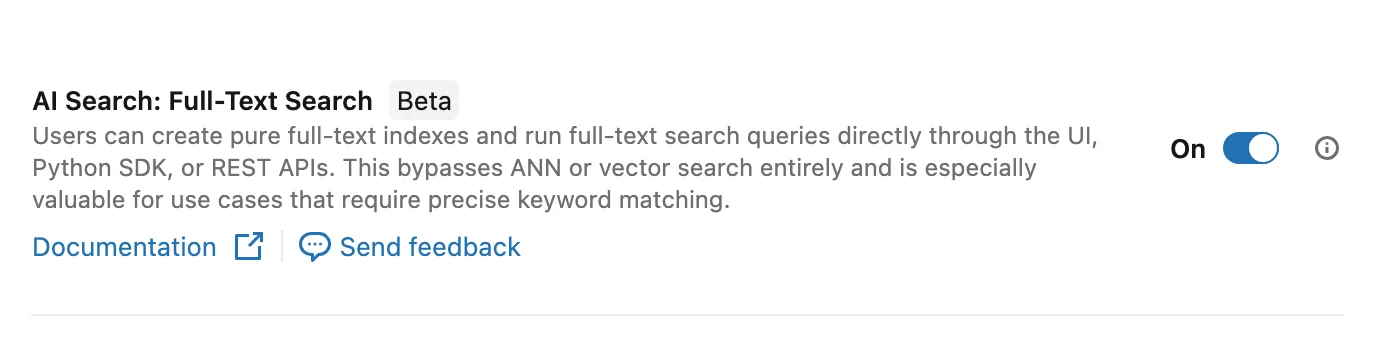
Workspace Previews page (2026-10-14): the FULL_TEXT mode in AI Search.
Buddy: similarity of meaning
The simplest way to see the "buddy" at work on Databricks is the ai_similarity function. It compares two texts and returns a similarity score, with no index and no model of your own. The function is in Public Preview and doesn't run on a Classic SQL warehouse. This isn't vector search yet, just the simplest way to see meaning compared with no setup at all.
✓ Tested on Free Edition (2026-10-17)
SELECT id, title,
       ai_similarity(body, 'Jak prawidłowo parzyć kawę?') AS score
FROM coffee_articles
ORDER BY score DESC
LIMIT 5;
The query computes a score for each of the 12 articles, sorts from the highest and keeps five. The buddy did not do as well here as in the analogy. For "Jak prawidłowo parzyć kawę?" the top places went to "Historia kawy" (coffee history, 0.679), "Regiony kawowe: Brazylia" (coffee regions: Brazil, 0.671) and "Cold brew na upały" (0.628). Of the four barista articles, only "Chemia wody w kawiarni" (water chemistry in the café) made the top five (ID 2, fourth place, 0.626).
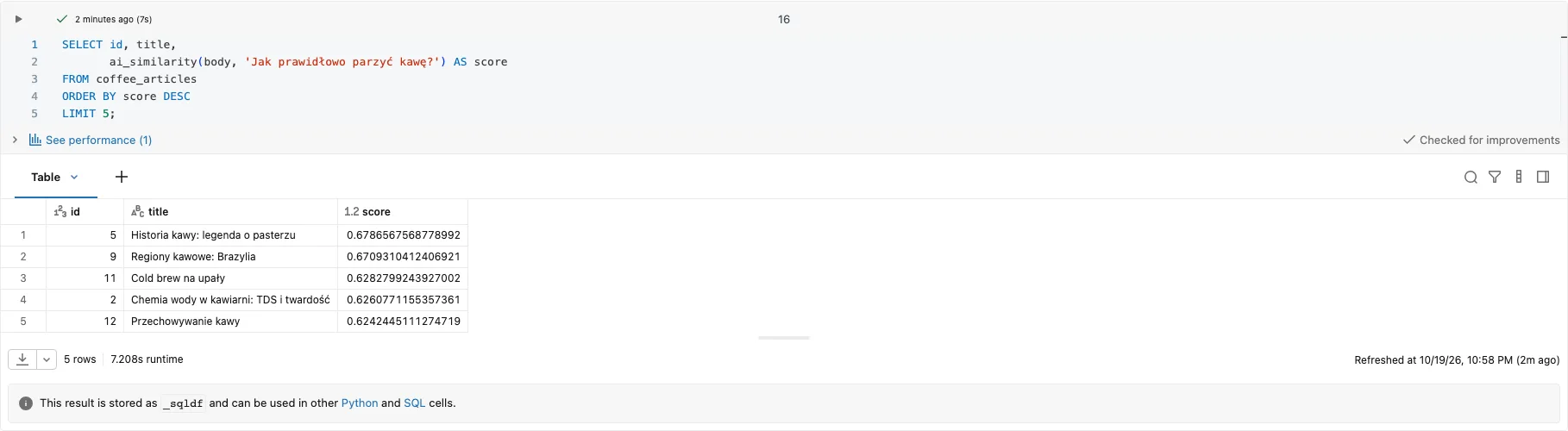
Lab result: the ranking for the barista's literal question.
Only when the question spelled out the intent, 'Profesjonalne techniki parzenia kawy dla zaawansowanych baristów' ("professional brewing techniques for advanced baristas"), did three barista articles (IDs 1, 2 and 3) make the top five. Brazil was still first (0.695).
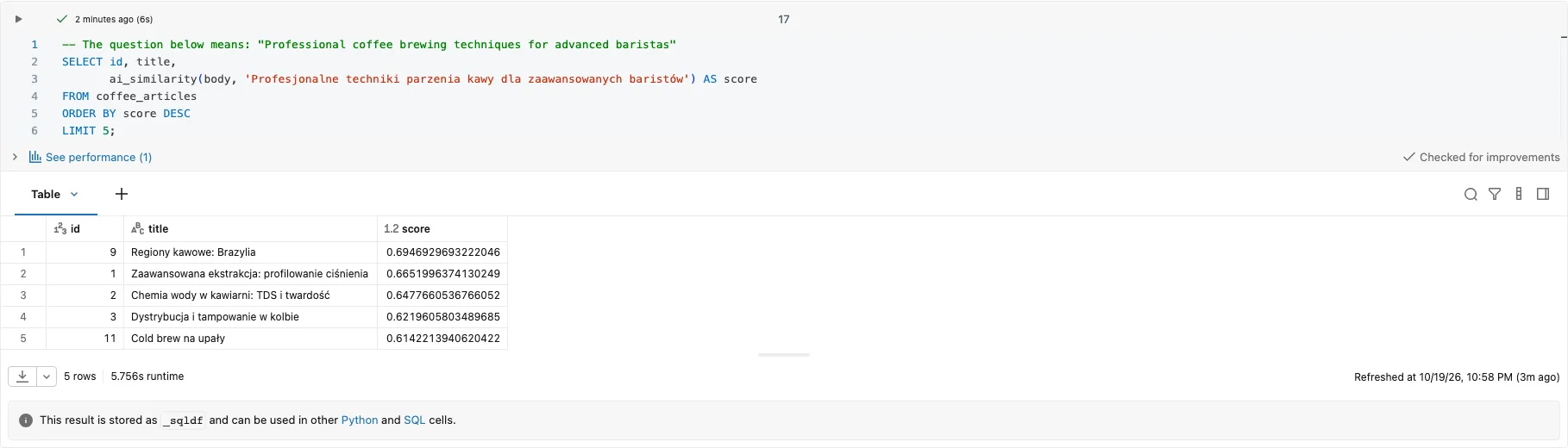
Lab result: the ranking for the question that describes the intent.
My takeaway is that the buddy understands more than the magnifying glass, but on short Polish texts and a one-sentence question it is no oracle. The result depends on the model and on how we phrase the question, so it pays to check the ranking on your own examples before building on it. On top of that, the docs say the ai_similarity score is relative and only meant for ranking, and that Databricks picks the model behind the function and may change it. So I look at the order, not at the numbers, and your numbers may come out different. For the same reason, let's not build thresholds (score > 0.65) or tests with an expected order on this score.
On a small table this is enough. With thousands of documents this approach stops making sense in both time and cost, because ai_similarity calls the model for every row on every question. Then we need embeddings computed once and refreshed incrementally, plus an AI Search index, and for Polish text a multilingual model (for example Qwen3-Embedding-0.6B, endpoint databricks-qwen3-embedding-0-6b, currently in Public Preview, instead of the English GTE Large (En)). We pick the model before building the index, because changing it means recomputing every embedding.
On such an index, vector_search() with query_type => 'HYBRID' combines the book with the buddy: vector (ANN) and full-text search run in parallel, and Reciprocal Rank Fusion (RRF) merges the results. The word part has no analyzer for Polish, though, so I wouldn't count on it handling inflected forms. How to build such an index and query it with vector_search() step by step (endpoint, Delta Sync index, query and cleanup) is shown in "SQL isn't dying, it's mutating". That notebook uses the English model databricks-gte-large-en and a plain query without query_type, so the default ANN. For Polish text we swap the model for databricks-qwen3-embedding-0-6b and add query_type => 'HYBRID'.
According to the Unity Gateway migration docs, a workspace admin turns the Enforce Unity Gateway setting on in Settings > Advanced; until someone does, your existing legacy configurations are unchanged. The setting itself is available in workspaces that have legacy AI Gateway endpoints, and when it is not shown there, the docs tell you to contact the account team after you complete and validate your migration (as of 3 November 2026). With enforcement on, the same docs say that creating AI Search endpoints through Unity Gateway is not yet supported, and that the pay-per-token databricks-* models are disabled. For us, on the lab workspace and on Free Edition, enforcement was off, and with it off the notebook for that post creates the endpoint and the index without errors. I haven't checked it with the setting on, so look at this setting on your own workspace before you plan an index.
Pitfalls
- Collation and diacritics. The result of
LIKEdepends on the column's collation, that is, the rules for comparing text. On Databricks,LIKE,ILIKEandRLIKEonly work with theUTF8_BINARYandUTF8_LCASEcollations, which are accent-sensitive. With another collation we get an error:body COLLATE UNICODE_CI_AI ILIKE '%parzyc%'fails with[DATATYPE_MISMATCH.UNEXPECTED_INPUT_TYPE] ... The first parameter requires the "STRING" type. Accent- and case-insensitive matching comes from thecontainsfunction (collations from DBR 16.1):contains(body COLLATE UNICODE_CI_AI, 'cisnienia')matches the pressure profiling article (ID 1, "ciśnienia"), whilecontains(body, 'cisnienia')andbody ILIKE '%cisnienia%'match nothing. - An empty alternative in a regex.
(a|b|)matches everything. The mistake doesn't throw an exception; it returns the whole table. - A leading
%.LIKE '%kawa%'can't use a range seek on a plain B-tree index, so on a big table it is usually a full scan. Some indexes do support it, e.g. trigram indexes in PostgreSQL (pg_trgm). - Full-text without a configured thesaurus. The index knows "vehicle" and "vehicles", but "car" is a different word to it until we add synonyms. The synonym dictionary (thesaurus) has to be configured and maintained by hand.
- Vectors always return something. Vector search returns the nearest neighbours even when the question has nothing to do with the data. A question about the city of Bielsko-Biała in a coffee database will also get its "best" five articles.
(?i)and Polish letters. In a regex,(?i)ignores case only for ASCII letters:'KAWĘ' RLIKE '(?i)kawę'returnsfalse, while'KAWĘ' RLIKE '(?iu)kawę'and'KAWĘ' ILIKE '%kawę%'returntrue. For Polish text, write(?iu). In the demo(?i)is enough, because in the words we match the only capital letters are plain ASCII ones ("Kawa", "French press"), and letters with diacritics are always lowercase.- The model and the language. According to the docs,
ai_similarityis tuned for English. For us, for both questions the article about Brazil, which has nothing to do with brewing, ranked high. The score is relative and only meant for ranking. For Polish text, test the model on your own examples. ai_similarityonly runs in regions that support AI Functions optimized for batch inference, so check the region list before you build a demo on it.- The first call can take a long time. In one of the runs on serverless the first
ai_similaritycall on 12 rows waited 4 min 21 s, and the second query took about 5 s. In later runs the first call took from about 5 to 8 s, so the time depends on whether the model happens to be "warm". Before a demo it's worth calling the function once in advance, and in a job, account for it in the timeout. And every query calls a model for every row, so on a big table we count cost, not just time.
When NOT to use it
- Vectors for codes, e-mails, numbers. If we know the pattern (
^[A-Z]{2}\d{4}$), a regex gives a deterministic and cheap result. A buddy who "roughly" matches an invoice number is a bad idea. - LIKE for questions about meaning. Adding more
OR LIKEclauses with synonyms quickly becomes unmaintainable. - Full-text when you can't maintain it. A full-text index is one more object to administer. On a small table
ILIKEis sometimes enough.
See it run
The recording shows the whole lab notebook, from ILIKE to ai_similarity and the cleanup.
Code for this article on GitHub →notebook and a step-by-step README · magnifying-glass-book-and-buddy
Summary
- The magnifying glass (
LIKE, regex) sees letters, the book (full-text) sees words and their forms, the buddy (vectors) sees meaning. - On the 12 demo articles,
ILIKE '%parzyć%'returns 0 rows, and'%kawa%'matches 1 of the 4 titles that contain some form of the word "kawa" (coffee).isearchknows whole words, but it doesn't know inflection either. - A regex with an empty alternative matches everything. Check the hit count before you trust the result.
ai_similarityput only one of the four barista articles in the top five for the literal question. The buddy also needs a well-phrased question and a check on your own data.
Want more posts? Follow along via RSS or on LinkedIn.
Comments
Quiet on the trail so far. Be the first to comment.