
 Krzysztof Burejza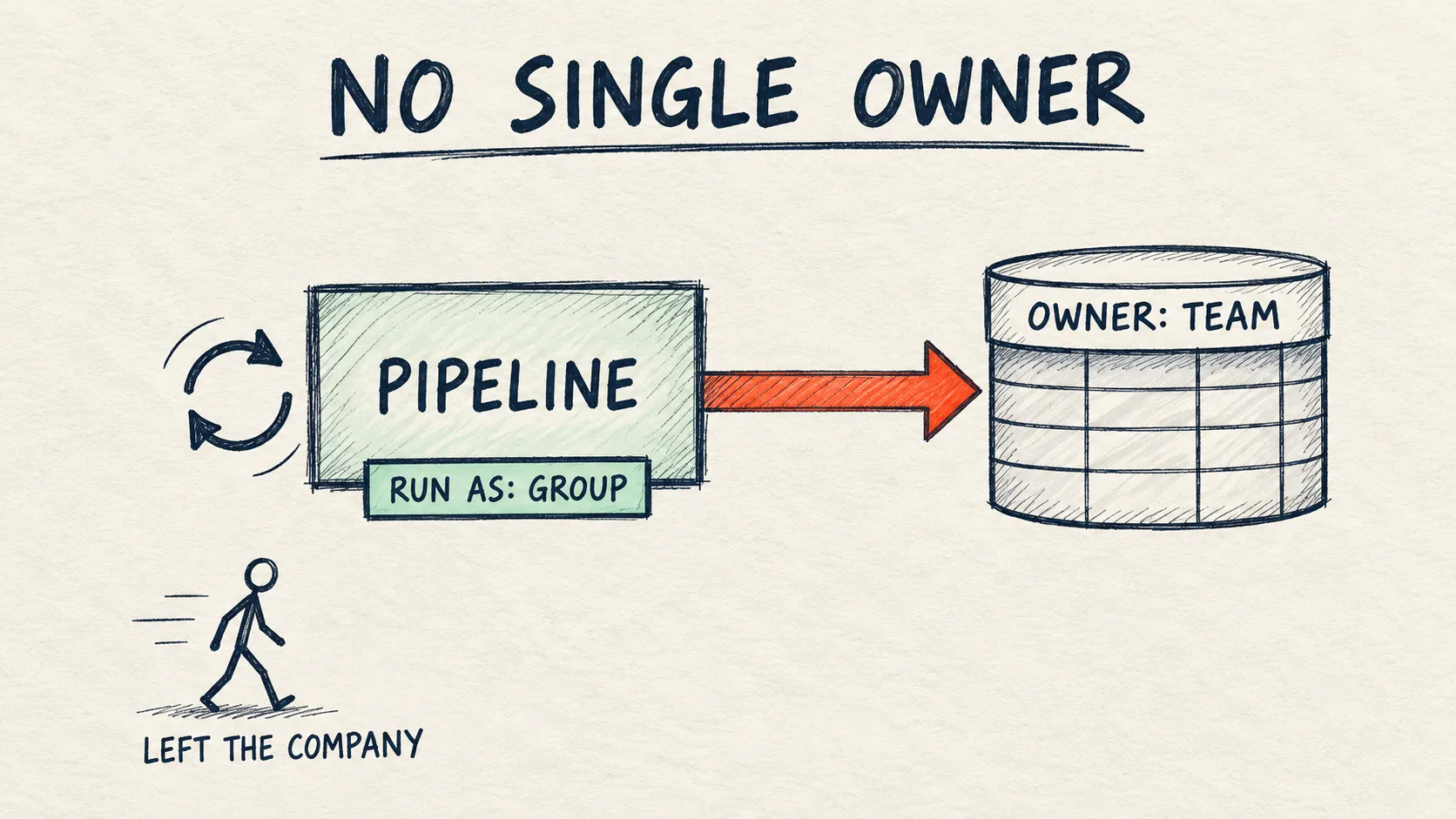
run_as (the API ignores updated_run_as), table ownership moves with run-as immediately, and the next bundle deploy doesn’t undo a manual run-as change.Problem
By default a pipeline runs as the person who created it. The docs spell out what happens when that person leaves the company and their account is disabled: the pipeline can stop working, and the tables it published can become inaccessible to others. In projects I often see production pipelines that "belong" to someone who moved to another team long ago.
Until now the alternative was a service principal. Now there's a third option: an account group. This is the second of two Lakeflow changes from the same day. I wrote about the first one, multiple triggers on a single job, in Lakeflow Jobs: multiple triggers on one job.
How it works
A pipeline's run-as can now be an account group, next to a user and a service principal. Updates run with the group's permissions, and in Unity Catalog pipelines the published tables are owned by the group. The release note doesn't mark this feature as Preview or Beta.
Some RBAC context: a role in Databricks is just an account group, so a pipeline with run-as set to a group simply runs as that role.
Group or service principal? The docs still call a service principal the best practice for automation. A group makes sense when the pipeline should belong to a team rather than a technical account: the tables are owned by the team, and changes in team membership break nothing. The price is that every member gets the permissions granted to the group for the pipeline (more in "When NOT to use it").
Requirements from the docs:
- An account group assigned to the workspace. Workspace-local groups don't work, and neither do the built-in
admins,usersandaccount users. - Who can set it: a member of the group, or someone with the Assume permission on the group (for roles with exclusive access). Plus CAN_MANAGE on the pipeline. With CI/CD deployment that "someone" is the deployment pipeline's service principal. It has to be a member of the group or have Assume on it, and membership also gives it all of the group's data permissions.
- The group needs everything the pipeline needs: the Workspace access entitlement, Can read on the code files and notebooks,
USE CATALOG,USE SCHEMAandCREATE TABLEon the target schema,CREATE SCHEMAif the pipeline creates schemas,MODIFYon existing tables the pipeline updates, and access to the sources. The docs also list Can use on the pipeline's cluster policy and permission to create compute. My lab ran on serverless, the group's only entitlement was Workspace access, and the update went through. The docs stress that granting these to yourself doesn't help, because the update runs as the group. Which of them are really needed, I checked with a matrix (in the pitfalls). - Run-as and the pipeline owner are separate settings. Switching run-as to a group doesn't change the pipeline owner.
In the REST API you set run_as.group_name when creating the pipeline. This is the pipeline from the notebook for this article (the pipeline code is one materialized view in a SQL file):
pipeline = {
    "name": "dataistheway_etl",
    "catalog": catalog,
    "schema": schema,
    "serverless": True,
    "libraries": [{"file": {"path": PIPE_DIR + "/mv_total_by_country.sql"}}],
    "run_as": {"group_name": GROUP},
}
pid = api.do("POST", "/api/2.0/pipelines", body=pipeline)["pipeline_id"]
print("run_as_user_name:", api.do("GET", f"/api/2.0/pipelines/{pid}")["run_as_user_name"])

def run_update():
    t0 = time.time()
    uid = api.do("POST", f"/api/2.0/pipelines/{pid}/updates", body={})["update_id"]
    while True:
        st = api.do("GET", f"/api/2.0/pipelines/{pid}/updates/{uid}")["update"]["state"]
        if st in ("COMPLETED", "FAILED", "CANCELED"):
            return f"{st} ({time.time() - t0:.0f} s)"
        time.sleep(10)

print("update as the group:", run_update())
✓ Tested on Free Edition (2026-10-17): steps 1–7 of the notebook go through, but step 3, run right after the group was created, failed with a membership error and only went through a few minutes later (see the pitfalls). Requires Unity Catalog and serverless.
When editing an existing pipeline (PUT /api/2.0/pipelines/{pipeline_id}), the docs say to use the updated_run_as field. This is where the lab showed the first mismatch. The notebook tries both fields in turn:
spec = api.do("GET", f"/api/2.0/pipelines/{pid}")["spec"]
try:
    api.do("PUT", f"/api/2.0/pipelines/{pid}", body={**spec, "updated_run_as": {"user_name": me.user_name}})
    print("updated_run_as accepted")
except Exception as e:
    print("updated_run_as:", str(e).splitlines()[0])

api.do("PUT", f"/api/2.0/pipelines/{pid}", body={**spec, "run_as": {"user_name": me.user_name}})
print("run_as_user_name:", api.do("GET", f"/api/2.0/pipelines/{pid}")["run_as_user_name"])
✓ Tested on Free Edition (2026-10-17): same result, updated_run_as rejected, run_as accepted.
In my lab, a PUT with the full spec and only updated_run_as (no run_as) was rejected as if run-as were being cleared:
Once configured, run_as of the pipeline can not be set to null.
Please set run_as to dataistheway-etl-team to preserve the pipeline's run_as
The same PUT with run_as: {"user_name": ...} went through, and run_as_user_name showed my login right away.
I checked where the error comes from separately, on a pipeline with run-as set to the lab's service principal. GET /api/2.0/pipelines/{pipeline_id} returns a spec without the run_as field (the identity only shows up in run_as_user_name). A PUT replaces the whole definition, so the API treats a body built from that response as clearing run-as. Even a PUT that only changed the pipeline name failed with the same error. updated_run_as on its own, even with the same identity, doesn't replace run_as, and a body with both fields went through. I also checked updated_run_as with a different identity than run_as. The API accepted both bodies, but run_as always decided the result: run_as = group with updated_run_as = service principal kept the group, and the other way round set the service principal. So updated_run_as is simply ignored. The practical takeaway: every PUT on a pipeline with run-as set must include run_as, also a script that changes something completely different. After the change, read run_as_user_name back.
In Declarative Automation Bundles (formerly Databricks Asset Bundles), according to the docs, you set group_name in the run_as mapping of the pipeline resource. Second mismatch: in the bundle schema from Databricks CLI v1.16.1, the pipelines.RunAs definition only has user_name and service_principal_name, and group_name exists only for jobs (jobs.JobRunAs, described as Private Preview). I checked it in my lab on a small bundle: databricks bundle validate in CLI v1.16.1 reports the warning unknown field: group_name at resources.pipelines.<key>.run_as, and the resolved configuration is left with an empty run_as. bundle deploy with that version fails: the CLI sends an empty object and the API rejects creating the pipeline with run_as object must have user_name, service_principal_name or group_name fields filled. The pipeline isn't created, but the bundle files are uploaded to the workspace anyway. In the CLI schema group_name appears in pipelines.RunAs from v1.18.0 (v1.17.0 doesn't have it), and in v1.20.0 validate no longer warns and a deploy with a group goes through (below). Since v1.20.0 bundles deploy only with the direct engine, because the Terraform engine was removed from the CLI. Note: the schema, v1.20.0 included, still marks this field for pipelines as Private Preview.
With a bundle there are two more things a team will trip over first. The first is the YAML level: we set the group in the resource's own run_as (resources.pipelines.<key>.run_as). According to the run identity page, the bundle-level and target-level run_as accept only user_name or service_principal_name, although the CLI v1.20.0 changelog mentions group_name support there too, so the docs are inconsistent here. The second is where the code lives, because the group has to read it. The jobs docs say to set workspace.root_path to a folder under /Workspace/Shared/ and grant the group CAN VIEW. In my lab I tried both options, with the same top-level permissions section (the group with CAN_VIEW):
root_pathunder/Workspace/Shared/: the CLI (v1.16.1 and v1.20.0) warns onvalidateanddeploythat the bundle folder is writable by all workspace users, because it inheritsCAN_MANAGEforusers. Thepermissionssection only landed on the pipeline; the group got no entry on the folder. The update as the group still went through. But anyone can replace the code that runs with the group's permissions.- Default folder (no
root_path): the files go to the home folder of the identity that deploys. The CLI granted the groupCAN_READon that folder, and only the deployer and admins can write to it. The update as the group went through.
So I keep the default folder. In CI that's the service principal's home folder, so only the deployment can change the pipeline code. This is the file I deployed and ran in my lab:
# A pipeline that runs as an account group (run_as.group_name).
# Tested on Databricks CLI v1.20.0 (the field has been in the schema since v1.18.0).
bundle:
  name: run_as_group_demo

variables:
  catalog:
    default: workspace
  schema:
    default: dataistheway_run_as
  group_name:
    default: dataistheway-etl-team

# No workspace.root_path: the code stays in the home folder of whoever deploys
# (in CI: the service principal), so other users can't change it.
# These permissions give the group CAN_VIEW on the pipeline and Can read on that folder.
permissions:
  - level: CAN_VIEW
    group_name: ${var.group_name}

resources:
  pipelines:
    etl:
      name: dataistheway_etl_bundle
      catalog: ${var.catalog}
      schema: ${var.schema}
      serverless: true
      libraries:
        - file:
            path: ./src/mv_total_by_country.sql
      run_as:
        group_name: ${var.group_name}

targets:
  dev:
    default: true
✓ Tested on Free Edition (2026-10-19): deploy and run of this bundle with a group go through, and the MV is owned by the group. I tested the bundle on CLI v1.20.0. The group_name field has been in the schema since v1.18.0, but I didn't test a deploy on 1.18 or 1.19.
Before the deploy the account group has to be assigned to the workspace, the identity that deploys has to be a member of it, and the group needs the grants from the matrix below. The source table source_orders must already exist in the schema. The bundle runs with the usual commands, and the variables (catalog, schema, group_name) go into the environment variables BUNDLE_VAR_catalog, BUNDLE_VAR_schema and BUNDLE_VAR_group_name: databricks bundle deploy, then databricks bundle run etl. In my lab the bundle used the catalog dataistheway, the schema news135_runas and the group news135-etl-team (the notebook on Free Edition used the same group), hence those names in the results and errors below. In my lab bundle deploy created the pipeline and its permissions (Resources: 2 created), run_as_user_name showed news135-etl-team, and the update from bundle run etl finished COMPLETED in about 40 s. mv_total_by_country is owned by the group, while source_orders belongs to the service principal that created it.
I checked drift like this: after the deploy I switched run-as to the service principal through the API. The MV owner changed to the service principal right away. bundle plan then showed 0 to change, 2 unchanged, and the next bundle deploy changed nothing: run-as and table ownership stayed with the service principal. The group came back only with a deploy that changed something in the pipeline definition (as a test I added development: true), because then the CLI sends the whole definition including run_as. So the next deploy won't undo a manual run-as change until someone changes the pipeline in the bundle. The direct engine docs say the next plan or deploy updates resources changed outside the bundle. For run-as that didn't happen in my lab. Most likely because a pipeline GET doesn't return run_as (see above), so the CLI has nothing to compare. That's why after every deploy in CI I read run_as_user_name and stop the deployment if it isn't the group.
Jobs can run as a group too. The docs describe Run as = group for jobs without a Preview label, and since CLI v1.18.0 the bundle schema marks group_name for jobs as GA.
Step by step: the lab demo
The notebook pipeline_run_as_group.py does everything through the REST API from inside a notebook, on serverless. Run it as a workspace admin, because it creates an account group. Next to it is the pipeline/ folder with the pipeline code. First the notebook creates the source table source_orders (5 rows).
- Creates the account group
dataistheway-etl-teamwith us as a member, assigns it to the workspace (/api/2.0/preview/permissionassignments/principals/{id},USER) and grants theworkspace-accessentitlement. - Grants the group
USE CATALOG, and on the schemaUSE SCHEMA,CREATE TABLE,CREATE MATERIALIZED VIEW,SELECTandMODIFY, plus Can read on the folder with the pipeline code. - Creates the serverless pipeline
dataistheway_etlwithrun_as.group_nameand runs an update. - Shows
table_ownerfrominformation_schema.tables. - Tries to create a pipeline with
run_as.group_nameset tousers. - Switches run-as back to us: first
updated_run_as, thenrun_as, and checks the MV owner right away. - Tries
ALTER MATERIALIZED VIEW ... SET OWNER TOthe group.
At the end the notebook deletes the pipeline with cascade=true, the table, the grants and the group.
Lab results (Azure Databricks Premium, trial, the whole notebook in about two minutes, including two 40-second pauses for the UI in the recording):
- Steps 1–2: the account group was created, and the workspace assignment, the entitlement and the grants went through without errors.
- Step 3: the pipeline with
run_as.group_namewas created right away,run_as_user_name=dataistheway-etl-team. Update as the group:COMPLETEDin 32 s. - Step 4:
mv_total_by_countryis owned bydataistheway-etl-team, whilesource_orders, which I created in the notebook, is owned by me. - Step 5:
userswas rejected (full error text in the pitfalls). - Step 6:
updated_run_asrejected,run_asaccepted. The owner ofmv_total_by_countrychanged to me right after the settings change, without a new update. - Step 7:
SET OWNER TOthe group failed withCHANGE_OWNER_NOT_ALLOWED_FOR_PIPELINE_TABLE.
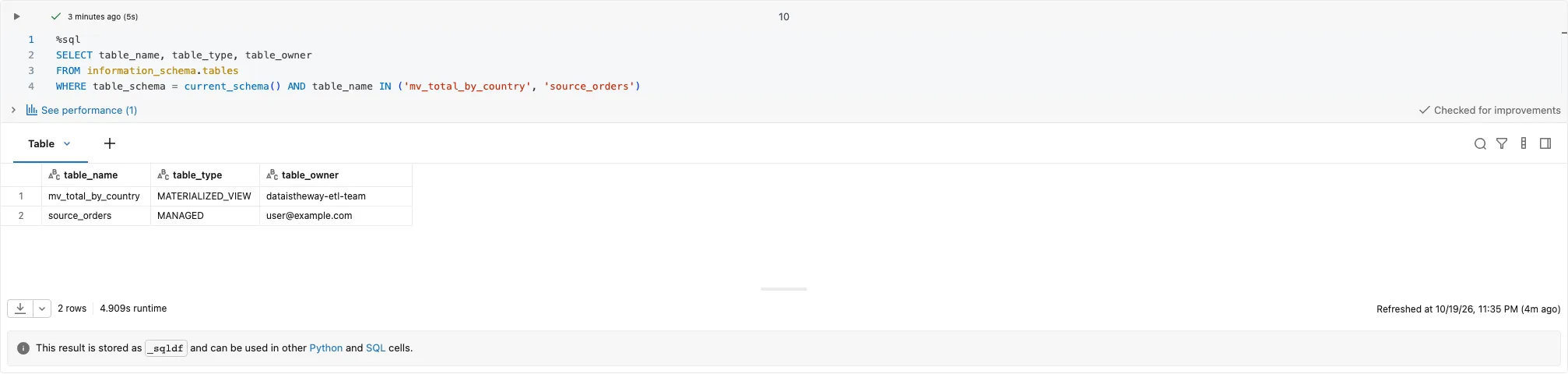
Lab result: the pipeline's MV is owned by the group, the source table by me.

Lab result: updated_run_as rejected, run_as accepted.
Pitfalls
- Built-in groups are out.
admins,usersandaccount userscan't be a pipeline's run-as, and neither can workspace-local groups. In my lab the pipelines endpoint returned:The group 'users' cannot be used as a run-as identity for jobs. Broad groups such as 'account users', 'admins', and 'users' are not allowed.The message talks about jobs even though it's a pipeline, so don't let that confuse you. Free Edition returns the same message. - "Group does not exist" doesn't always mean a typo. An account group that isn't assigned to the workspace gives the same bundle deploy error as a group that doesn't exist at all:
'<group>' cannot be set as run_as because the group does not exist. Before hunting for a typo, check that the group is assigned to the workspace. - A freshly created group may not "know" its members yet. On Free Edition, step 3 right after step 1 failed with
Cannot bind the group provided in 'run_as' field (news135-etl-team) to the pipeline. The user creating or updating the pipeline must be a member of the group or have 'Can Assume' permission on the group., even though I had been in the group since it was created. The same POST a few minutes later went through. On the Premium lab step 3 went through right away. If a script creates a group and immediately creates the pipeline, this error can mean a delay rather than missing membership. - The group needs its grants, but not every one that gets listed. Your own grants don't help, because the update runs as the group. In my lab I took away one permission at a time and ran the pipeline from the bundle in two situations: the first update (no MV yet) and a refresh of an existing MV.
| Without | First update | MV refresh | Error |
|---|---|---|---|
USE CATALOG |
the deploy doesn't create the pipeline | the update doesn't start | on deploy Principal 'news135-etl-team' does not have USE CATALOG on Catalog 'dataistheway'. (403 PERMISSION_DENIED), on start User does not have USE CATALOG on Catalog 'dataistheway'. |
USE SCHEMA |
FAILED | FAILED | The pipeline's run-as identity 'news135-etl-team' does not have permissions on 'dataistheway.news135_runas'. Details: User does not have USE SCHEMA on Schema 'dataistheway.news135_runas'. |
CREATE TABLE |
FAILED | FAILED | The pipeline's run-as identity 'news135-etl-team' does not have permission to create table in schema dataistheway.news135_runas |
CREATE MATERIALIZED VIEW |
FAILED | COMPLETED | Principal 'news135-etl-team' does not have CREATE MATERIALIZED VIEW on Schema 'dataistheway.news135_runas'. |
SELECT |
FAILED | FAILED | [INSUFFICIENT_PERMISSIONS] Insufficient privileges: Principal 'news135-etl-team' does not have SELECT on Table 'dataistheway.news135_runas.source_orders'. |
MODIFY |
COMPLETED | COMPLETED | – |
| Can read on the code folder | not tested | FAILED | [LIBRARY_FILE_NOT_FOUND] File '.../files/src/mv_total_by_country.sql' was not found or the run_as user does not have permissions to access it. |
I took the schema grants (USE SCHEMA, CREATE TABLE, CREATE MATERIALIZED VIEW, SELECT, MODIFY) away at the schema level. For an MV from a pipeline that leaves USE CATALOG, USE SCHEMA, CREATE TABLE, CREATE MATERIALIZED VIEW (only when it is created), SELECT on the source and Can read on the code. MODIFY wasn't needed for creating or refreshing, and the final bundle run went through without it. CREATE TABLE is needed even for a refresh. The errors name the group's run-as directly, except a missing Can read, which looks like a missing file. I didn't test the Workspace access entitlement, because the lab's service principal can't remove it from the group, and we don't add it to admins for the test. That entitlement has mattered since 14 September 2026, when the users group lost its entitlements and new principals get them explicitly.
- Pipeline owner and run-as are two different things. After switching run-as to a group, the pipeline is still owned by the same person. The tables belong to the group, the pipeline doesn't. Change the owner separately. The simplest setup is a pipeline deployed by a bundle from CI/CD on a service principal: the pipeline owner is then that SP and run-as is the group, and neither depends on a specific person. In the demo the pipeline is created from my account, so the video shows exactly the "Owner = a person" state.
- Table ownership follows run-as, immediately. In my lab, after switching run-as from the group to me, the MV owner changed as soon as the settings were saved, without waiting for an update. Switching run-as "just for a quick test" takes table ownership away from the group. That is why run-as in production is set only by the deployment (a bundle from CI), never by a manual edit in the UI.
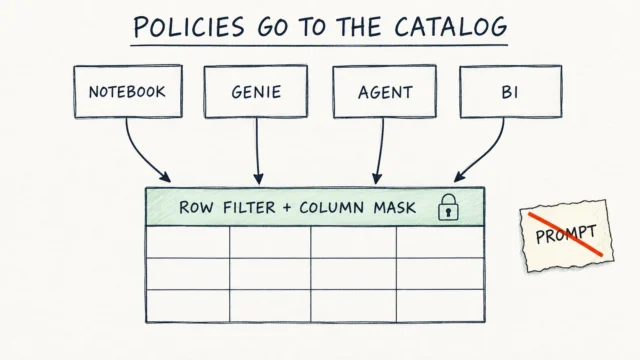
- ABAC policies on sources. According to the ABAC docs, the pipeline refreshes MVs and streaming tables with the run-as identity (or the pipeline owner when run-as isn't set). If the group is subject to an ABAC policy on the source tables, the MV permanently contains masked or filtered data. So switching run-as to a group can change the tables' content, not just their owner. Since 3 August 2026 the refresh itself no longer needs an exemption. If the MV should hold unmasked data, the docs say to add the run-as identity to
EXCEPT, but then the exemption covers every member of the group on all tables the policy applies to, also in notebooks, SQL and Genie. Tag propagation (Beta) doesn't cover MVs and streaming tables created by pipelines, so readers of the MV are protected only by a policy on the MV itself, that is governed tags set by hand on its columns (ALTER MATERIALIZED VIEW ... ALTER COLUMN ... SET TAGS, DBR 16.3+). The docs only warn that a pipeline update can undoALTERchanges that contradict the definition, and say nothing about tags. In my lab, plain (non-governed) tags set withALTER MATERIALIZED VIEWon a column and on the MV itself survived a normal update and a full refresh. So with ABAC on the sources, run-as should be a service principal or an empty role group (see "When NOT to use it"), not the team group. Only the CI service principal gets Assume on such a role group, because after assuming a role listed inEXCEPTthe policy no longer applies to the session, and anyone with Assume sees the data unmasked. Roles (RBAC) are also still in Public Preview. SET OWNER TOwon't change the owner of a pipeline table. The docs say a group is set as the owner of an MV or streaming table in the UI. The SQL error was broader than the docs describe:[CHANGE_OWNER_NOT_ALLOWED_FOR_PIPELINE_TABLE] Changing owner is not supported for a table managed by the pipeline with ID '<id>'. Modify the run-as identity of the pipeline instead.The message doesn't mention groups at all and points to run-as instead. On Free Edition the ending reads slightly differently (Modify the run as user of the pipeline instead.), so scripts should match the error code, not the whole text. Scripts that "fix" table owners with SQL after a migration won't work here.

Lab result: ALTER MATERIALIZED VIEW ... SET OWNER TO the group.
- Changing run-as can interrupt an active update. According to the docs, a continuous pipeline restarts with the new identity, and a triggered one applies it on its next run.
updated_run_asvsrun_as. The docs say to useupdated_run_asfor edits, but in my lab a full PUT with onlyupdated_run_as(norun_as) failed with "run_as of the pipeline can not be set to null", and onlyrun_aswent through. Every PUT built from a GET response withoutrun_asadded gets the same error, because GET doesn't return it. With a different identity thanrun_as, the API acceptsupdated_run_asbut ignores it. After every change, readrun_as_user_nameback, as in step 6.- Cleanup can be incomplete. With an earlier version of this demo, a deleted account group still existed the next day, and internal
__materialization_mat_..._mv_total_by_countrytables stayed in the schema even after deleting the pipeline withcascade=true. The group and schema names are notebook widgets. If the group from a previous run still exists, step 1 fails, so before a rerun change the group name or delete the old group in the account console. bundle destroyleaves the tables. Afterbundle destroythe pipeline is gone, butmv_total_by_countrystays in the schema. The first update of a new pipeline from the same bundle then failed withTable ... is already managed by pipeline <id>. A table can only be owned by one pipeline.In my labDROP MATERIALIZED VIEWbefore the next deploy fixed it.
What I didn't test
I describe these above based on the docs or the CLI schema, without a lab run:
- Group
run_asat the bundle and target levels (I only testedrun_ason the pipeline resource). - Jobs with run-as set to a group.
- A bundle deploy with a group on CLI v1.18 and v1.19.
- Classic compute and Can use on the cluster policy (my lab ran on serverless).
- A pipeline without the Workspace access entitlement (the reason is next to the permission matrix).
- Streaming tables and tables the pipeline updates (the matrix covers an MV).
- Setting a group as the MV owner in the UI.
- Changing run-as during an active update.
- Sources with ABAC policies, and governed tags with a policy on the MV.
- An empty role group with Assume only for the CI service principal.
When NOT to use it
- When the group has people and broad permissions. Everything you grant the group for the pipeline (for example
MODIFYon production tables) every member gets too. If you don't want that, use a service principal or an empty group used as a role with the Assume permission. A simple rule per environment: in dev and test run-as can be the team group; in production use a service principal or an empty role group on which only the CI service principal has Assume. Otherwise every team member getsMODIFYon production tables. This is a pattern from the RBAC docs (in Public Preview), and I didn't build it in my lab. - For jobs, if you haven't tested it yourself. The docs cover jobs, but I only tested a pipeline.
- When you deploy the pipeline with a bundle from a CLI older than v1.20.0. On v1.16.1 the deploy fails with a 400 and the pipeline isn't created. The field has been in the schema since 1.18, and I tested deploy and run with a group on 1.20.0, so that version or newer is what I pin in CI. On 1.18 and 1.19 you can still force the Terraform engine, and the Terraform provider docs for
databricks_pipelinelist onlyuser_nameandservice_principal_nameunderrun_as, so I wouldn't count on that path. A group set through the API after the deploy isn't a workaround either: the next deploy neither fixes nor undoes it until the pipeline definition changes (see the drift test above).
See it in action
Recording of the notebook run. During the run the video switches to the pipeline page in the UI: you can see the update, the owner and "Run as" set to the group, and after step 6 back to the user. The wait for the update is sped up 8× in the video. In the recording the notebook uses the lab catalog dataistheway and has two extra time.sleep(40) lines to show the UI. They're not in the repo.
Code for this article on GitHub →notebook and a step-by-step README · lakeflow-pipeline-run-as-group
Summary
- A pipeline can run as an account group (
run_as.group_name). The tables it publishes are then owned by the group. - The group needs the pipeline's grants: for the MV in my lab
USE CATALOG,USE SCHEMA,CREATE TABLE,CREATE MATERIALIZED VIEW,SELECTand Can read on the code, withoutMODIFY, plus the Workspace access entitlement (from the docs, I didn't test without it). The built-inadmins,usersandaccount usersaren't allowed. - For edits the docs say
updated_run_as, but in my lab the API ignores it, and a PUT withoutrun_asis rejected. GET doesn't returnrun_as, so add it to every PUT. After a run-as change, the tables move to the new identity right away. - I tested a bundle with
run_as.group_nameon CLI v1.20.0, and that's the version I pin in CI. Keep the code in the deployer's folder, and checkrun_as_user_nameafter the deploy, because the next deploy doesn't undo a manual run-as change. - Run-as and the pipeline owner are separate settings, and
SET OWNER TOon a pipeline table fails withCHANGE_OWNER_NOT_ALLOWED_FOR_PIPELINE_TABLE.
Want more posts? Follow along via RSS or on LinkedIn.
Comments
Quiet on the trail so far. Be the first to comment.