
 Krzysztof Burejza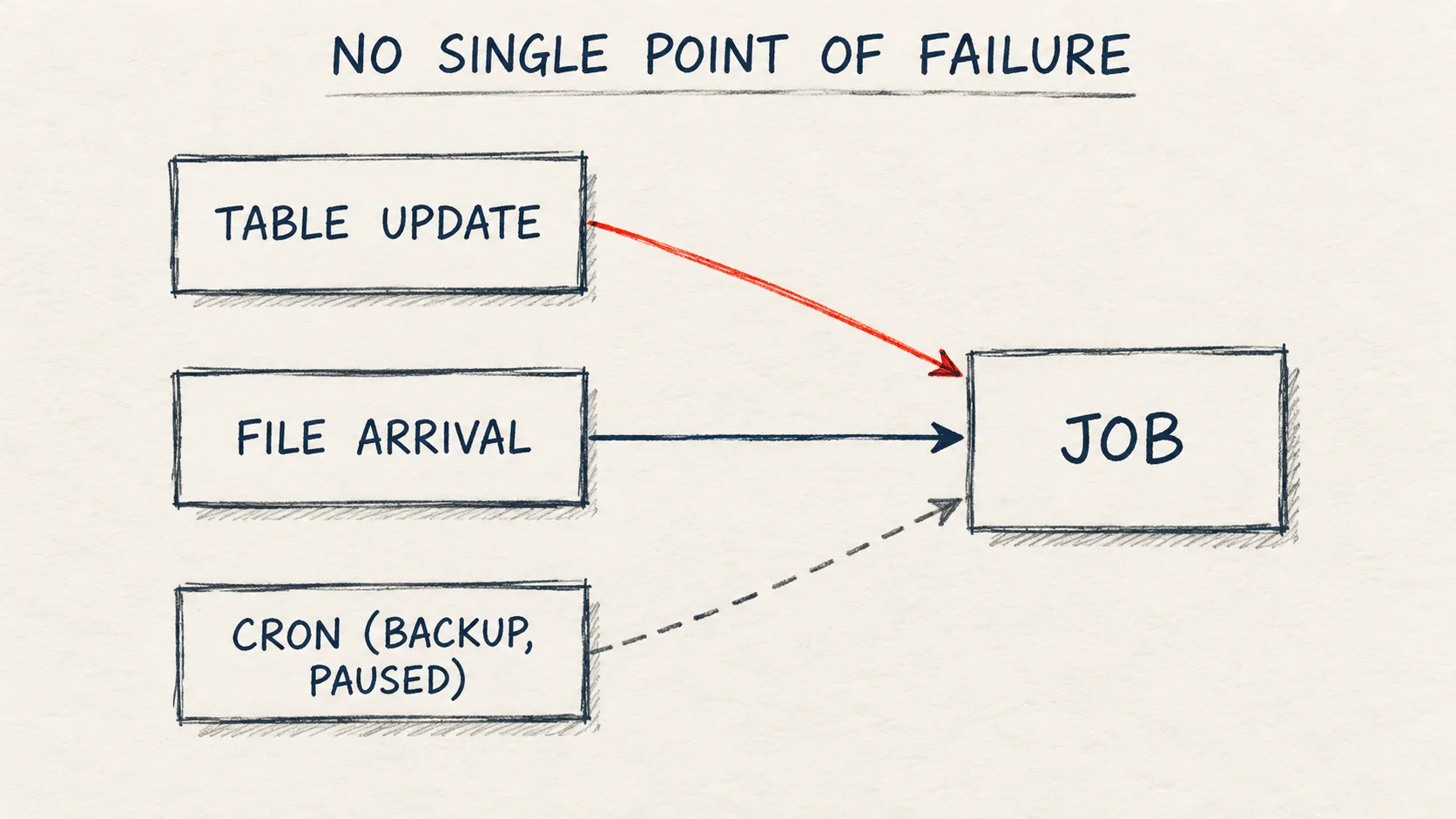
table and file_arrival in {{job.trigger.type}}. Most of the pitfalls are in the details: an update replaces the whole trigger array without any warning, and a job with triggers no longer accepts the legacy schedule field.Problem
In projects I often see a scenario that ends with the question: "why has this report been showing stale data for a week?".
The job has a single trigger. Table update or file arrival is a good approach, because the job starts when the data is actually ready, not at an agreed time. But if the upstream process stops writing to the table, the job simply never starts. There's no error and no failed-run alert, because no run ever started. Until now a job had one trigger field or one schedule, so a backup schedule meant a second job.
On the same day Lakeflow got a second change: a pipeline can run as an account group. I covered it separately in Lakeflow: a pipeline that doesn't belong to one person.
How it works
A job can have several triggers of the same or different types. A run starts when any active trigger fires. The typical example from the docs: table update as the main trigger and a schedule as the backup. You can also watch two file locations with two file arrival triggers.
A backup schedule is still a second run, not "a run only if the other one didn't start". The cron also starts the job on days when the table update has already processed the data, so the task has to be idempotent. And the backup won't notice that the source has stalled: it recomputes the same stale data and ends with SUCCESS, so the report from the start of this post is still out of date, just with a green run. The backup helps when the data is there but the trigger didn't fire (for example, someone paused the table update trigger and forgot to resume it). If we want to know that the source stopped writing, the task started by the schedule (it then gets periodic in {{job.trigger.type}}) checks source freshness and fails once the SLA is exceeded. Then the usual failed-run notification does its job.
What's worth knowing before you turn it on:
- Beta behind a toggle. A workspace admin turns it on in Previews with the Multiple Triggers setting.
- Up to five triggers per job during the Beta. Regardless of the preview, a workspace has a limit of 12,000 active triggers (paused ones don't count).
- Each trigger has its own Pause/Resume. In the UI these are separate controls in Schedules & Triggers, in the API it's the
pause_statusfield on the array element. - Continuous doesn't combine with anything. A continuous job runs all the time anyway, so a
continuoustrigger must be the only one.
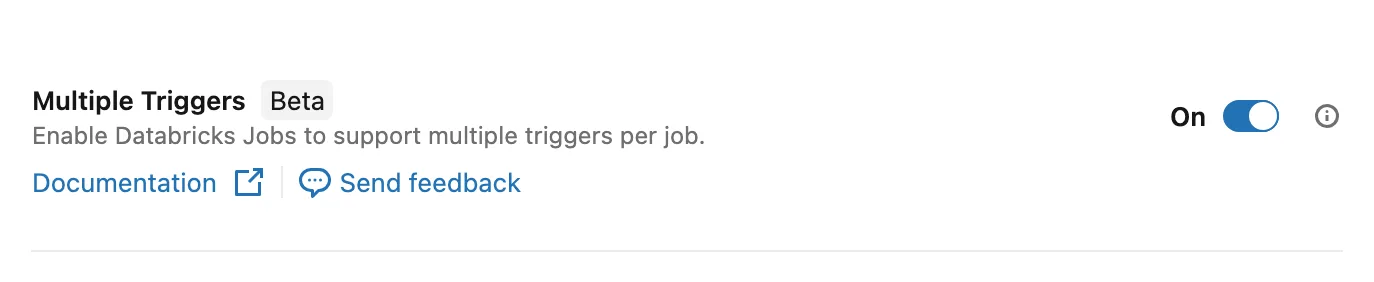
Workspace Previews page: without this toggle a job with a triggers array fails with FEATURE_DISABLED.
In the Jobs API (2.1 and later) it's a new triggers array in JobSettings. Each element has exactly one trigger type (table_update, file_arrival, schedule, periodic, continuous, or model for a model update trigger) and optionally pause_status. Below is the job from the notebook for this article.
✗ Does not work on Free Edition: the triggered run waits in the queue with Queued due to reaching maximum number of allowed active runs (1) (2026-10-17).
job = {
    "name": "news134_multiple_triggers",
    "tasks": [{
        "task_key": "log_trigger",
        "notebook_task": {
            "notebook_path": TASK_NB,
            "base_parameters": {"log_table": f"{catalog}.{schema}.trigger_log",
                                "trigger_type": "{{job.trigger.type}}"},
        },
    }],
    "triggers": [
        {"table_update": {"table_names": [f"{catalog}.{schema}.source_orders"]}},
        {"file_arrival": {"url": LANDING}},
        {"schedule": {"quartz_cron_expression": "0 0 6 * * ?", "timezone_id": "Europe/Warsaw"},
         "pause_status": "PAUSED"},
    ],
}
job_id = api.do("POST", "/api/2.2/jobs/create", body=job)["job_id"]
print("job created")
The recording and the results below come from a Premium workspace with the Multiple Triggers preview enabled. Without the preview jobs/create fails with the error shown in the pitfalls below.
Steps 1–2 (the job with three triggers and reading it back) worked on Free Edition, so the preview is on there. I ran the notebook there as a job, that run took the only allowed active run, and the run started by the table change waited in the queue. The Free Edition docs list a limit of 5 concurrent job tasks per account, so the message about one active run surprised me. I haven't run the notebook interactively on Free Edition.
The schedule in this example is paused (PAUSED). That's fine for the demo, but in production a paused backup does nothing on its own: someone first has to notice the missing run and resume it. If the backup should work by itself, set it to UNPAUSED.
Two details in this JSON are easy to miss. pause_status sits on the array element, not inside schedule as in the legacy schedule field. And schedule in an element has only two fields, both required: quartz_cron_expression and timezone_id. I checked the element shape in the bundle schema from Databricks CLI v1.16.1 (databricks bundle schema, definition jobs.TriggerConfiguration). In my lab jobs/get returned the array with three elements and an explicit pause_status on each (UNPAUSED where I hadn't set it). The server also added condition: ALL_UPDATED to table_update, which I hadn't sent.
Three rules from the docs that decide how you write automation (I checked the second one in my lab and the first one partly, results below):
- Don't send
triggersin the same request as the legacyschedule,triggerorcontinuous. - Updating
triggersreplaces the entire array. You can't "add" or "resume" a single trigger by sending only that one. I confirmed this in my lab, results below. - In Declarative Automation Bundles (formerly Databricks Asset Bundles) the same field is
triggerson the job resource (job.triggers), with the same keys as in the API. The bundle schema has the field from Databricks CLI 1.13.0; 1.12.1 doesn't have it. What an older CLI does with it is in the pitfalls. I deployed the bundle with CLI 1.20.0.
How do you know which trigger started a run? The trigger field in the jobs/runs/get response only tells you the trigger type (TABLE, FILE_ARRIVAL, PERIODIC and so on). The task gets the same value, in lower case, through {{job.trigger.type}}: in my lab the task logged table and file_arrival. A table update run also has trigger_info.details with the table name and its version. In the system.lakeflow.jobs system table, a job with two or more triggers has trigger_type = MULTIPLE, an empty trigger column, and you read the configuration from the triggers array. If you monitor jobs with system tables, fix the queries and alerts on trigger_type or trigger before turning on multiple triggers, because they will stop seeing these jobs.
Step by step: the lab demo
The notebook lakeflow_multiple_triggers.py does everything through the REST API from inside a notebook, on serverless. Next to it is the task/ folder with the notebook the job runs: it writes the {{job.trigger.type}} value to trigger_log. First the notebook creates the source table source_orders, the trigger_log table and the landing volume.
- Creates the job with the three triggers from the code above.
- Reads the job settings back with
jobs/get. - Waits 90 s, inserts 2 rows into the source and waits for a run with
trigger = TABLE. - Drops the file
orders_1.jsonintolanding/orders/and waits for a run withtrigger = FILE_ARRIVAL. Then shows what the tasks wrote totrigger_log. - "Only resumes the schedule": sends
jobs/updatewith atriggersarray of one element and reads back how many triggers are left. - Sends the legacy
scheduleto a job that already hastriggers.
At the end the notebook deletes the job, the tables and the volume.
I ran it on my admin account in an Azure Databricks Premium (trial) workspace with the Multiple Triggers preview on. The whole notebook took about 5 minutes: 90 s of that is a deliberate pause before the INSERT, and 80 s are two 40-second pauses added only so the recording can show the job in the Jobs UI (they are not in the code on GitHub, and neither is the default catalog dataistheway in the widget that you can see in the recording). Step 3 takes the longest (about 3 minutes), because the cell waits until the run finishes.
- Step 1:
jobs/createwith three triggers went through without errors. - Step 2:
jobs/getreturned 3 triggers with an explicitpause_statusand an addedcondition: ALL_UPDATEDontable_update. The step also prints the queue setting: a job created with API 2.2 without aqueuefield got{'enabled': True}. - Step 3: a run with
trigger = TABLEstarted 13 s after theINSERTand ended withSUCCESS. - Step 4: a run with
trigger = FILE_ARRIVALstarted 8 s after the file was written.trigger_loghas two rows:tableandfile_arrival. - Step 5:
jobs/updatewith one element (the resumed schedule) went through without a warning, andjobs/getthen showed just 1 trigger. Table update and file arrival were gone. - Step 6:
schedulealone on a job withtriggersfailed (full error text in the pitfalls).
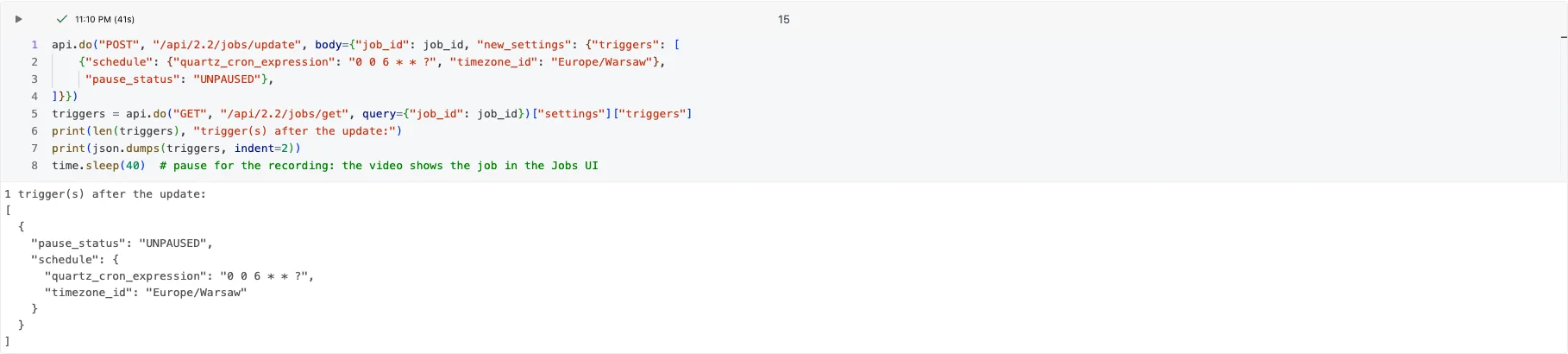
Lab result: after jobs/update with one element, the job only has the schedule left.
Pitfalls
- An update replaces the whole
triggersarray. A script that "only resumes the schedule" and sends one element deletes the other triggers. The safe pattern:jobs/get, change the array you got back,jobs/updatewith the full array. In my lab the API gave no warning at all, it simply kept one trigger out of three. In a bundle this problem goes away, because you always deploy the whole definition, but two others appear (the next two points). mode: developmentand thetriggersarray. The docs say a target withmode: developmentpauses all schedules and triggers. I checked what the CLI actually does: inbundle validate -o json(CLI 1.13.0, 1.20.0 and 1.21.0) the legacyschedulein the dev target getsPAUSED, while the elements of thetriggersarray are left alone. The server showed the same: a job deployed to the dev target (CLI 1.20.0) had the table updateUNPAUSEDand the schedulePAUSED, as in the YAML. After anINSERTinto the table, a run withtrigger = TABLEstarted 8 s later and ended withSUCCESS. If a trigger should stay paused on dev, setpause_status: PAUSEDon it yourself.- A manual pause comes back on deploy. A trigger paused by hand in the UI or through the API returns to the YAML state on the next deploy. I checked this in my lab (CLI 1.20.0): after pausing the table update trigger through the API (
jobs/updatewith the whole array),bundle planshowedupdate jobs.orders, and afterbundle deploythe trigger wasUNPAUSEDagain. The legacyschedulebehaved the same way. So a trigger paused for longer (say, during a source outage) goes into the repo. - Several triggers, one run at a time. By default a job can have one active run, and without queueing a run over the
max_concurrent_runslimit is skipped: there's no error, the run gets theSKIPPEDstate, and anon_failurenotification arrives if the job has one and nobody ticked Mute notifications for skipped runs (at job level this setting doesn't mute notifications configured on tasks). So a backup cron that hits a running table update run is lost without an alert when the job has no notifications or skipped runs are muted. That's the situation from the start of this post again. In my lab I started a job withmax_concurrent_runs: 1and a 90-second task twice in a row. Without queueing the second run gotSKIPPEDstraight away, withresult_state: MAXIMUM_CONCURRENT_RUNS_REACHEDand the messageSkipping this run because the limit of 1 maximum concurrent runs has been reached.With queueing (queue.enabled: true) the second run waited asQUEUEDfor 99 s and then ended withSUCCESS. The queue holds a run for up to 48 hours. - The default queue depends on how the job was created. In my lab a job created with Jobs API 2.1 had no
queuefield, and one created with API 2.2 got"queue": {"enabled": true}. So did a job deployed with a bundle. The docs add that in the UI queueing is the default for jobs created after 15 April 2024. So in automation I setqueue.enabledexplicitly instead of relying on the client's API version. - You won't see the collision on dev. A job deployed to a target with
mode: developmentand nomax_concurrent_runsgotmax_concurrent_runs: 4in my lab, so two runs go in parallel there. To make dev behave like production, setmax_concurrent_runs: 1on the job (in a prod target without a mode the CLI set 1). - Mixing with legacy fields.
triggerscan't go in one request withschedule,triggerorcontinuous. That also applies to tools that render job JSON from a template that containsschedule. In my lab evenschedulealone, sent to a job that already hastriggers, was rejected:This job has multiple triggers configured via 'triggers'. Use the 'triggers' field to manage them; 'schedule', 'trigger', and 'continuous' cannot be set.The message says "multiple triggers", even though after step 5 the job had only one. What counts is thetriggersfield itself; the number of elements doesn't matter. - Nothing works without the toggle. With the Multiple Triggers preview off, a job with
triggerswon't be created. In my lab I gotNotFound FEATURE_DISABLED: The 'triggers' field is in private preview and is not enabled for this workspace.A CI/CD pipeline that deploys the same bundle to several workspaces needs the preview on in each of them. Note that the message says private preview, even though the release note and the docs call the feature a Beta, so searching the docs for "Beta" may not lead you to it. I checked this with a bundle in my lab while the preview was off:bundle validatein CLI 1.20.0 ends withValidation OK!, and onlybundle deployreturnscannot create resources.jobs.orders: The 'triggers' field is in private preview and is not enabled for this workspace. (404 FEATURE_DISABLED). For a job that already exists, the same error comes fromjobs/reset. -
An older CLI deploys the job without triggers. Databricks CLI 1.12.1 only reports
Warning: unknown field: triggersatbundle validateand exits with code 0.bundle deploywith that version ends withDeployment complete!, and the deployed job hastriggers: null, so it will never start on its own. In CI, pin the CLI version you tested (1.20.0 in my lab; thetriggersfield is in the schema from 1.13.0, but per the CLI changelog only 1.15.0 fixed a job with atable_updatetrigger that never converged on the direct engine) and runbundle validate --strict, which fails on that warning withError: 1 warning was found. Warnings are not allowed in strict mode. CLI 1.12.1 didn't break a job that already had triggers: after its deploy the job still had both. So the problem is the first deploy, for example to a new workspace. -
You can't tell which of two same-type triggers fired. A run only carries the trigger type. With two file arrival triggers on different paths, the task has to find the new files itself (for example Auto Loader on both paths). The docs describe
{{job.trigger.file_arrival.location}}in the singular and don't say what it returns with two file arrival triggers, so I wouldn't build logic on it yet. For table update,{{job.trigger.table_update.updated_tables}}lists the changed tables; file arrival has no equivalent. - A table update trigger needs run-as access to the table. Per the docs, the Run as identity must have
SELECTon every monitored table plusUSE CATALOGandUSE SCHEMA. In my lab I checked the case where access is missing already when the job is created: a trigger onsystem.billing.usage, where the lab service principal has noUSE SCHEMA, didn't go through (the same error with thetriggersarray and with the legacytriggerfield).jobs/createreturnedPERMISSION_DENIED: User does not have USE SCHEMA on Schema 'system.billing'. The worse case is when run-as losesSELECTlater or you switch the job to another identity: per the docs the trigger then fails to evaluate and the job doesn't start, and you only find out if the job has a failure notification (on_failure). I couldn't reproduce that case in my lab: I ran the permission tests as the lab service principal, which hasALL PRIVILEGESon the whole catalog, and a privilege inherited from the catalog can't be revoked on a single table. - Run-as can also be a group. The Jobs docs recommend a service principal as run-as in production, but a job (like a pipeline, covered in Lakeflow: a pipeline that doesn't belong to one person) can also run as an account group:
run_as.group_namein the API and on the job resource in a bundle. The group has to be assigned to the workspace, and then it's the group that needsSELECTon the trigger's tables. Per the docs, a group can be set as run-as by its member or by someone with the Assume permission, and the group needs access to everything the job uses, including read access to its notebooks. The docs add that a bundle deploys files to the deploying user's home folder by default, so setworkspace.root_pathto a shared folder with CAN VIEW for the group. In my lab the API rejected the built-in groups:The group 'users' cannot be used as a run-as identity for jobs. Broad groups such as 'account users', 'admins', and 'users' are not allowed.An account group that isn't assigned to the workspace gave the same error as a group that doesn't exist:'data-engineers' cannot be set as run_as because the group does not exist.I'm not showing a job running as a group: I ran these tests as the lab service principal, which can't create an account group (a Databricks account admin does that). - The notebook waits 90 s before the
INSERT. It gives the trigger time to start after the job is created. I haven't tried a shorter gap. In the notebook and the recording I wrote that a fresh trigger first records the table state. I haven't found that in the docs, so treat it as my assumption.
When NOT to use it
- In production, while it's a Beta that depends on a workspace toggle. If the same bundle goes to dev and prod, until GA I would keep
triggersonly in the dev target, because the first prod deploy without the preview fails withFEATURE_DISABLED. The condition: the base job has no trigger at all,schedulesits in the prod target andtriggersin the dev target (whatmode: developmentthen does to triggers and concurrent runs is in the pitfalls). A target doesn't remove a field from the base. I checked it withbundle validate -o json(CLI 1.20.0): withschedulein the base andtriggersin the dev target, the dev configuration has both fields andvalidategives no warning. Onlybundle deployfails, withcannot create resources.jobs.orders: The 'triggers' field cannot be set together with any of 'schedule', 'trigger', or 'continuous'. (400 INVALID_PARAMETER_VALUE). The layout that worked in my lab is below. Until then, a backup schedule can be a second, simple job. For missing fresh data an alert works better, for example a SQL alert that checksmax()of the load timestamp column, or Unity Catalog anomaly detection (Public Preview), which watches table freshness. - When different triggers should run different logic. A run doesn't say which trigger fired, only its type. Two separate jobs are clearer.
This is a bundle with that layout. The base job has no trigger, the dev target gets the triggers array (table update and a paused backup schedule), and the prod target a plain schedule. ${var.catalog} and ${var.schema} are bundle variables.
✓ Requires the Multiple Triggers preview for the dev target; tested on Premium.
bundle:
  name: multiple_triggers_demo

variables:
  catalog:
    default: workspace
  schema:
    default: dataistheway_triggers

resources:
  jobs:
    orders:
      name: news134_bundle_triggers
      tasks:
        - task_key: log_trigger
          notebook_task:
            notebook_path: ./src/log_trigger.py
            base_parameters:
              log_table: ${var.catalog}.${var.schema}.trigger_log
              trigger_type: "{{job.trigger.type}}"

targets:
  dev:
    mode: development
    default: true
    resources:
      jobs:
        orders:
          triggers:
            - table_update:
                table_names: [ "${var.catalog}.${var.schema}.source_orders" ]
            - schedule:
                quartz_cron_expression: "0 0 6 * * ?"
                timezone_id: Europe/Warsaw
              pause_status: PAUSED
  prod:
    resources:
      jobs:
        orders:
          schedule:
            quartz_cron_expression: "0 0 6 * * ?"
            timezone_id: Europe/Warsaw
The source_orders and trigger_log tables must exist before the deploy (step 0 of the notebook creates them), because a trigger on a table that doesn't exist is rejected when the job is created. In my lab (CLI 1.20.0) bundle deploy to dev created a job with two triggers, the run started by a table change wrote table to trigger_log, and bundle deploy -t prod created a job with just the schedule. I haven't tested this bundle on Free Edition.
See it in action
Recording of the notebook run. During the run the video switches to the job page in the Lakeflow Jobs UI: you can see the three triggers, the "By table update" and "By file arrival" runs, and after step 5 just one trigger. The waits for the runs are sped up 8× in the video.
Code for this article on GitHub →notebook and a step-by-step README · lakeflow-multiple-triggers
Summary
- A job can have up to five triggers (Beta, Multiple Triggers toggle). In the API it's the
triggersarray, each element with one type and its ownpause_status. - In my lab the job started from a table change and from a file, and
{{job.trigger.type}}only tells you the trigger type. - Updating
triggersreplaces the whole array (with no warning in my lab) and doesn't mix with the legacyschedule,triggerorcontinuous. - In a bundle, pin the CLI version you tested (1.20.0 in my lab) and use
bundle validate --strict: CLI 1.12.1 deployed the job without a single trigger and without an error. - A backup schedule in the same job is a second run: the task has to be idempotent, the job needs queueing, and only a freshness check will catch a stalled source. While it's a Beta, keeping the backup in a separate job is safer in production.
Want more posts? Follow along via RSS or on LinkedIn.
Comments
Quiet on the trail so far. Be the first to comment.