
 Krzysztof Burejza
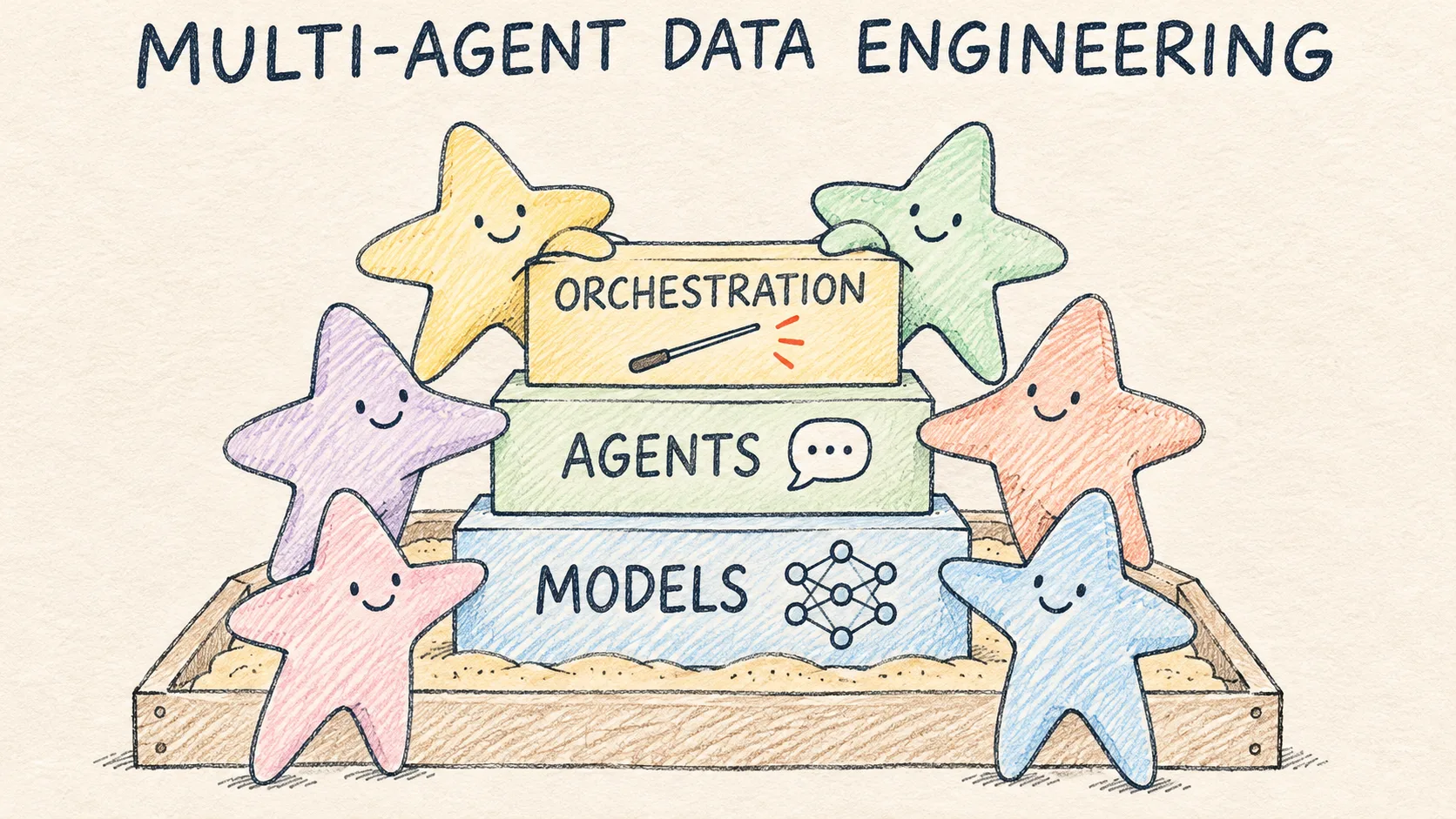
This article is based on my talk "Multi-Agent Data Engineering: Claude, Codex, Local AI and Databricks with Omnigent" at the 4th Warsaw Databricks Community meetup (27 October 2026). At the talk I had 45 minutes and six recorded demos, so here I can add the details there was no time for. I work at Databricks as a Resident Solutions Architect, but this blog is private and the opinions in it are my own.
Omnigent version: I recorded the demos on 26–27 October 2026 on Omnigent 0.20.0 as a development build (commit 611429347, with one local fix in deploy.py). Stable 0.20.0 was released on 28 October 2026, the day after the talk, and my build is about 50 commits older. The project is alpha and changes very quickly, so in newer versions the commands, policy names and UI may change.
Problem
Over the last year most of us have worked with one AI assistant. We ask it for a pipeline, then for a review of the same code, and usually hear that everything looks fine. The reviewer, however, shares the author's assumptions, because it is the same model with the same context. That is the question I opened the talk with: "Who reviews the reviewer?"
To give the review something to find, I left a trap in the demo data. Returns arrive as separate events with a positive quantity, so a plain SUM(quantity * unit_price) counts a return as a sale. On the demo data that sum comes to 372,479.64: 23,944.09 (the value of returns) above gross sales of 348,535.55, and 47,888.18 above the correct net revenue of 324,591.46. I assumed the second model, the reviewer, would catch it, but it was caught earlier, in the plan (more in Demo 3).
Why more than one agent
The reasons are similar to a human team with code review and separate roles. Each agent can have a different job (planner, implementer, reviewer, scanner) and a different model. A model from another vendor may catch different mistakes than the one that wrote the code. Sensitive code can go to a local model, and a cloud model is used where it pays off. On top of that, a large job, such as migrating dozens of notebooks, can be split across several agents at once.
Keep in mind, though, that N agents do not give an N times better result. You add coordination, a higher bill, more time, conflicting edits to the same files, and the question of who is accountable for the result. So you need a layer that manages it, and in my demos that layer was Omnigent.
What Omnigent is
Omnigent is an open-source control plane (the docs call it a meta-harness) for coding agents such as Claude Code, Codex, Pi, Cursor or Copilot. A harness is simply the agent program that Omnigent runs. Omnigent runs agents as sessions you can share, govern and orchestrate. It does not replace Claude Code or Codex; it gives them a shared place to work.
There is also a managed version on Databricks (Beta, enabled by a workspace admin on the Previews page), but only in regions with Unity Gateway and without custom Python policies (it supports CEL policies). So in the demos I self-hosted the server on Databricks Apps.
Architecture on Databricks
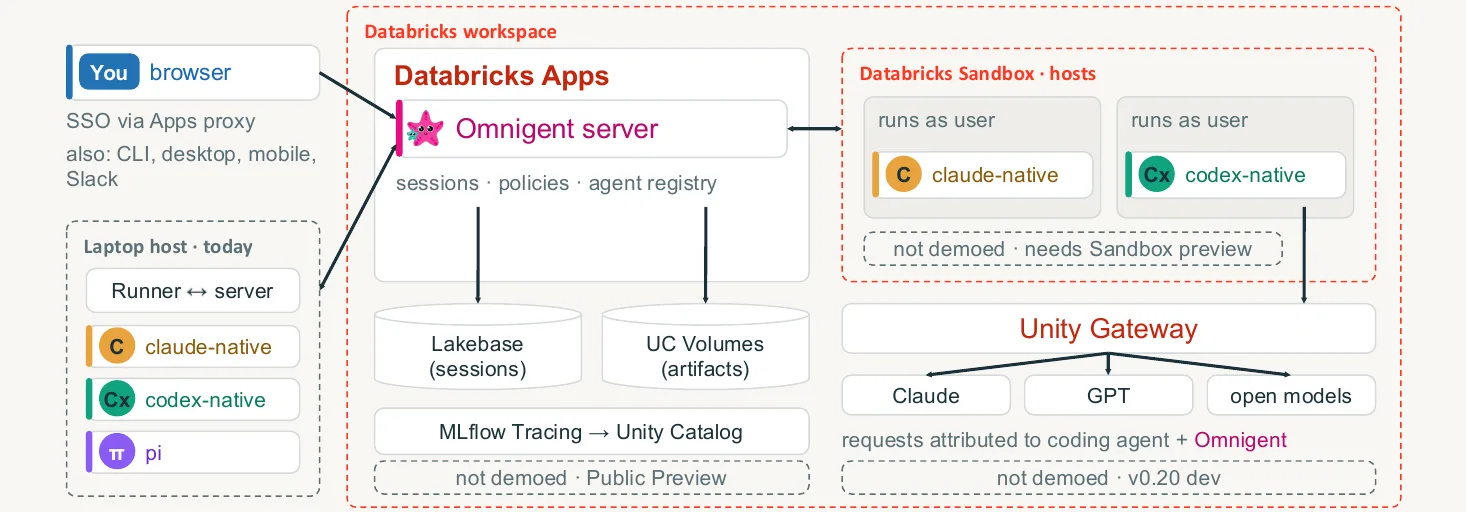
The Omnigent server runs as a Databricks App, so sign-in goes through the Apps proxy, which means workspace SSO (Entra ID in my case). Sessions and history live in Lakebase (Postgres), and artifacts in a Unity Catalog volume. The agent itself runs on a host, in my case a MacBook registered with the server. The session lives on the server and the agent works on the host, which is why you see the same session in the terminal and in the browser.
The diagram also shows three things I did not demo: hosts in Databricks Sandbox (Beta, enabled in Previews, select regions), model call attribution in Unity Gateway (since Omnigent 0.20.0) and MLflow Tracing to Unity Catalog (GA since July 2026). I describe them from the docs; I have not tested them.
An agent is a folder of YAML
Every agent has its own config.yaml with the harness (Claude Code, Codex, Pi), the prompt, the list of sub-agents and the guardrails. A sub-agent is a subfolder with its own config.yaml, and a skill is a Markdown file. Guardrails are Omnigent policies: for example, blast_radius blocks force-push and destructive commands and asks before a push or a deploy, and spawn_bounds limits how many sub-agents can start in one turn. One policy set applies to every harness through its hooks. It is worth adding that this controls what the agent can do in an Omnigent session; it is not a security boundary against people, because anyone with access to the laptop can run Claude Code or Codex outside Omnigent.
You do not need API keys to start. You sign in to Claude Code and Codex with the plans you already have (Claude Pro/Max, a ChatGPT plan), and according to the docs Omnigent detects those logins itself (omni setup). I did not record that step, because my harnesses were already configured. You can also use an API key, an OpenAI- or Anthropic-compatible gateway (OpenRouter, LiteLLM, Ollama, vLLM, Azure) or a Databricks profile with Foundation Models / Unity Gateway. My demos ran on personal subscriptions and only in a lab. For a team it is better to use the API tier with Unity Gateway, so usage is governed and attributed to people.
Six demos
All recordings come from the lab: Omnigent on Databricks Apps in an Azure workspace (Premium trial), with a 36 GB MacBook as the host. The data and pipeline are the retailhub bundle: a data generator plus bronze and silver layers in Lakeflow. The gold layer is missing on purpose, because building it is the agents' task. Waits in the videos are sped up (marked "▶▶ ×N"), and English captions are burned in.
Demo 1: Omnigent in a Databricks workspace
Deploying the server takes a Lakebase project and a Unity Catalog volume, deploy.py --no-otel, granting the app's service principal access to Lakebase (grant_sp_perms.py), and a second deploy. The recording starts after the deploy and shows the app resources (postgres is Lakebase, artifact_volume holds artifacts), the host online and the harnesses configured.
Next I start Claude Code in a terminal on the Mac:
✓ Tested on a Premium workspace (Azure trial, 2026-10-26): the server on Databricks Apps, the agent locally on the host; I have not tested Free Edition
omnigent claude
The session appears in the browser right away, together with the terminal view. A question typed in the browser goes into the same session, and Claude answers in the terminal. The first answer took 1 min 37 s; the video speeds it up. At the end I share the session with a second user at Edit level. They see the same transcript and terminal, and their messages carry their avatar. Their messages are still handled by Claude Code on my host and on my subscription, so in a team everyone should work on their own plan or API key, ideally through Unity Gateway.
Code for this article on GitHub →notebook and a step-by-step README · multi-agent-de-omnigent
Demo 2: Debby, Claude vs GPT
Debby is a built-in agent with a lead on claude-sdk, two sub-agents (Claude and GPT, where GPT runs through the Codex harness) and a debate skill. I asked both the same design question for the gold layer: materialized view or streaming table, and how to handle returns. I recorded Debby after the Polly demo, so Claude already sees gold.sql from PR #1 in the repo.
Both reached the same conclusion: a materialized view with gross, returned and net revenue columns. With /debate each critiqued the other's answer and conceded a few points. The reasoning got more precise, but the verdict did not change. The open questions, how strict the expectations should be and where deduplication lives, Debby left for me to decide. The answers took about 3 minutes and the debate round about 10.
Demo 3: Claude builds, Codex reviews
Polly is Omnigent's built-in orchestrator. It delegates work and asks a model from another vendor for the review, but it never writes code itself and never merges. I typed the task in the browser, and Polly ran it in six steps:
Add a gold layer to the retailhub pipeline in demo/: daily revenue per store and product category, with expectations (non-null keys, revenue >= 0). Open a PR. Claude Code implements, Codex reviews. Work in English.
- Plan (2 min 2 s). Polly read
generate_data.pyand, before any code existed, wrote the trap into the plan: returns arrive as positive rows, and some events have nostore_id. - Implementation (8 min 57 s). Claude Code, in its own git worktree, wrote
gold.sql, ranbundle validate, a deploy and a pipeline run in the lab (devtarget, my CLI profile, 1,683 rows), then opened PR #1. It computes net revenue, so the trap never reached the reviewer. - Codex quota. Codex's first review stopped after 2 seconds on the ChatGPT plan's usage limit. Polly did not switch vendors without asking. It ran an interim review on the local model, which said "PASS" but with the sign logic backwards, so Polly marked it as non-binding and waited for Codex (the video has only one caption about it). After the reset I nudged it with "Codex quota is back…", because its timer had not fired yet.
- Codex review (2 min 15 s): PASS with three nits. Polly kept two of them: store uniqueness is not enforced, so a duplicate dimension row would multiply revenue, and a code comment claims more than the expectations check, because
COALESCEhides NULL keys. It rejected the third with a reason: Codex wanted the row counts labelled as fixture results, but Polly had verified them on a lab run. - At my request Polly sent both nits back to Claude Code. The fixes took 6 min 16 s, and the Codex re-review took 2 min 11 s and ended with PASS, both nits closed. Codex added one new, hypothetical nit, which I left open for a decision.
- PR #1 stays open, and the merge is mine, not Polly's.
The key part of the PR #1 solution is a sign on every event (the full gold.sql is in the code repo):
✓ Tested on a Premium workspace (Azure trial, 2026-10-26): Lakeflow Spark Declarative Pipelines on serverless, 1,683 rows; I have not tested Free Edition
CASE WHEN o.event_type = 'RETURN' OR o.status = 'RETURNED' THEN -1 ELSE 1 END AS sign,
...
CAST(SUM(sign * gross_amount) AS DECIMAL(18, 2)) AS revenue,
CAST(SUM(CASE WHEN sign > 0 THEN gross_amount ELSE 0 END) AS DECIMAL(18, 2)) AS gross_revenue,
CAST(SUM(CASE WHEN sign < 0 THEN gross_amount ELSE 0 END) AS DECIMAL(18, 2)) AS returned_revenue,
The OR doesn't count a return twice, because in the data generator only return events have the RETURNED status, and a sale row keeps its own status. A return gets -1, so revenue is net revenue, while gross and returns sit in their own columns. Returns are booked on the day of the return, so net revenue for a given day can come out negative, which on the demo data affects 95 of 1,683 rows. For that reason the revenue >= 0 expectation only warns, and the hard rules (FAIL UPDATE) are on the three keys and on gross_revenue >= 0. Here the agent relaxed a requirement from my prompt (revenue >= 0) on its own. The reasoning is sound, but it is a business decision a human should sign off, not the reviewer model.
The full Polly run was about 25 minutes of agent work (plus the wait for the Codex quota reset) and $8.47 at list price according to omnigent usage, of which $7.49 was Claude and $0.98 two Codex reviews. That is only an estimate, though; what I actually paid was the Claude Max and ChatGPT subscriptions.
Demo 4: a local model as a private reviewer
This demo uses Pi with qwen3-coder 30B (the 32k-context build) in Ollama, on a 36 GB MacBook. The model list shows only local Ollama models. I asked for a review of PR #1 and silver.sql, focused on personal data and expectations.
The model found a real gap: customer_name and customer_email reach silver unmasked, and it suggested a column mask (in practice a column mask or a view/ABAC, depending on the access policy). It took 54 seconds (on the second take; the first took 104 seconds and gave a vaguer answer) and cost $0 in API fees. It also had one false positive (it claimed the gold keys have no expectations; they do) and approximate line numbers. That is enough for a first pass, but I would not base a merge decision on this review. No model vendor sees the code (where the transcript ends up is covered in the pitfalls).
Demo 5: private review, the cloud model never sees the files
In this demo I wanted to separate reading the code from judging the review. The private-review agent has two roles. local_reviewer (Pi in Ollama) reads silver.sql and the PR #1 diff on the laptop. The judge (Claude on claude-sdk) gets no file or shell tools from the harness and grades only the review text, and other tools, such as Omnigent's ui_open_file, are denied by policy. I show one of the agent's four policies; the rest are in the full file in the code repo:
✓ Tested on a Premium workspace (Azure trial, 2026-10-27): the Omnigent server, local_reviewer locally in Ollama; I have not tested Free Edition
guardrails:
  policies:
    tool_allowlist:
      type: function
      function:
        path: omnigent.policies.builtins.cel.cel_policy
        arguments:
          expression: >-
            event.type != "tool_call" ? {"result": "ALLOW"} :
            (has(event.data.name) && event.data.name in
            ["sys_session_send", "sys_read_inbox", "sys_cancel_task", "ToolSearch",
            "read", "grep", "find", "ls"])
            ? {"result": "ALLOW"}
            : {"result": "DENY", "reason": "private-review: the cloud judge may only dispatch local_reviewer and read its final report; local_reviewer may only read files. Shell, write, browser and session-history tools are blocked."}
    # ... reviewer_stays_local, review_pii_gate, pii_in_user_message
The judge rated the review "low-to-medium trust". Without reading any file it noticed that the reviewer reported a check on bronze.sql it had never read, that one finding was reasoned backwards, and that the line numbers did not hold together. The local review took about 50 seconds, and the whole run from prompt to verdict about 2.5 minutes, including one follow-up round.
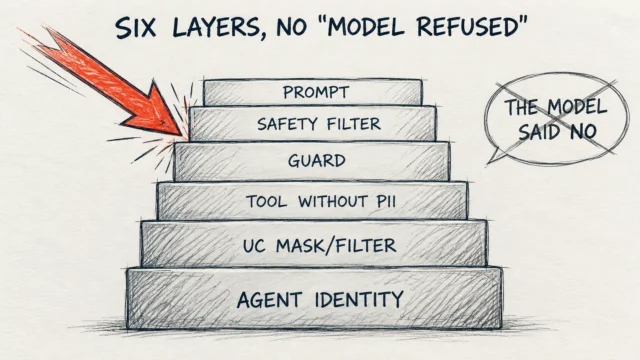
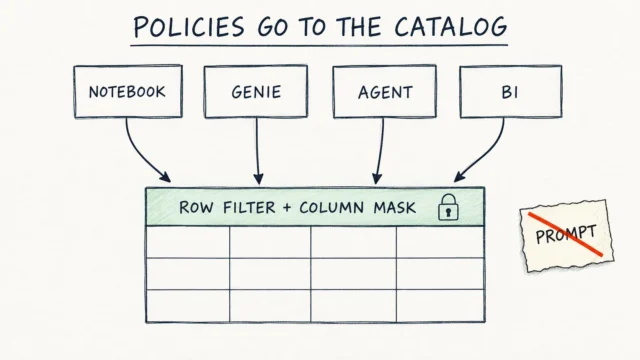
At the end I asked the judge to open silver.sql. At first it declined, but only because its prompt tells it to. Then I told it to call the ui_open_file tool, and the server rejected the call with "Denied by policy". So the block works regardless of whether the model behaves the way we asked. I wrote more about the same idea in Policies go to the catalog, not the prompt and Six layers of agent defence.
The protection here has two separate layers: the judge gets no file or shell tools from its harness, and a CEL policy rejects the remaining calls. The allowlist alone would let read through, because local_reviewer needs it. What Omnigent configuration and policies enforce, and what is only in the prompt:
| Enforced by Omnigent configuration and policies | Prompt only |
|---|---|
The judge has no harness file or shell tools, and ui_open_file is denied by policy |
What the local model chooses to write in its report |
| Session history reads and model overrides are blocked | |
| A review containing an e-mail address is withheld from the judge |
The review filter catches only e-mail addresses, though, so names or phone numbers in the report would get through. On top of that, account-level connectors of the cloud model's CLI sit outside this policy and should be disabled for sensitive work.
Demo 6: your own agent
In the last demo I built a custom team, lakehouse-reviewer. It is four config.yaml files and one skill with a checklist. Below I show them without the prompts; the full files are in the code repo.
lakehouse-reviewer/
  config.yaml                  # lead, claude-sdk
  agents/implementer/          # Claude Code
  agents/reviewer/             # Codex
  agents/local_scanner/        # Pi + Ollama
  skills/review-dabs/SKILL.md
The lead writes no code. It plans, delegates and combines the findings:
✓ Tested on a Premium workspace (Azure trial, 2026-10-26): the Omnigent server, local_scanner locally in Ollama; I have not tested Free Edition
name: lakehouse-reviewer
executor:
  type: omnigent
  config:
    harness: claude-sdk
tools:
  agents:
    - implementer
    - reviewer
    - local_scanner
guardrails:
  policies:
    blast_radius:
      type: function
      function:
        path: omnigent.inner.nessie.policies.blast_radius
    spawn_bounds:
      type: function
      function:
        path: omnigent.inner.nessie.policies.spawn_bounds
        arguments:
          max_dispatches_per_turn: 4
In newer versions the same policies live under omnigent.policies.builtins.orchestration, and the old path stays for compatibility. The local scanner is a few lines:
✓ Tested on a Premium workspace (Azure trial, 2026-10-26): the Omnigent server, local_scanner locally in Ollama (Pi + qwen3-coder 30B, 36 GB MacBook); I have not tested Free Edition
name: local_scanner
executor:
  type: omnigent
  config:
    harness: pi
    model: ollama/qwen3-coder-32k:latest
I started the agent from the agent list in the browser and asked for a review of PR #1. Codex and the local model worked in parallel, Codex for 1 min 25 s and the local scanner for 1 min 54 s. The whole run, from the request to the combined table, took 4 min 41 s and cost $0.97 (the lead on Claude $0.53, Codex $0.44). The result: 5 blockers, 1 major and 1 minor. The two models shared only one finding, unmasked personal data in silver. Codex found the other blockers: duplicate events, statuses other than sale and return counted as revenue, expectations at the wrong aggregation grain, and join fan-out in silver. The lead did not run bundle validate itself and flagged that in the table as a verification gap.
You can share an agent like this in three ways. Privately, where omnigent agent add gives you your own copy that only you can see:
✓ Tested on a Premium workspace (Azure trial, 2026-10-26): the Omnigent server; I have not tested Free Edition
omnigent agent add agents/lakehouse-reviewer
In a team, the agent is a folder in git, so it goes through pull requests like any code, and teammates install it straight from the repo (I have not tested that variant). Across the organization, the server operator publishes it as a server agent; in my setup that was part of the Databricks Apps deploy. In the recording a second user sees lakehouse-reviewer in Settings → Custom agents without installing anything.
Cloud vs local
The fairest comparison comes from Demo 6, where both models worked in the same run on the same PR. Codex got the full checklist and the local scanner only personal data and expectations, so the tasks were not identical:
| Codex (cloud) | Pi + qwen3-coder 30B (local) | |
|---|---|---|
| Review time in Demo 6 | 1 min 25 s | 1 min 54 s |
| Review cost in Demo 6 | $0.44 | $0 in API fees |
| Findings | Precise, with file and line | Found the personal data, 1 false positive, approximate lines (Demo 4) |
| Interim review during the Codex quota (Demo 3) | n/a | "PASS" with the sign logic backwards; Polly caught it |
| Code sent to a model vendor | Yes | No |
Costs are list-price estimates from omnigent usage; what I actually paid was the Claude and ChatGPT subscriptions.
What surprised me was that the same PR got two very different verdicts. Codex, called by Polly, looked only at the gold layer diff and gave PASS with three minor nits. lakehouse-reviewer ran Codex with a checklist plus the local scanner over the whole pipeline and reported 5 blockers. I checked those blockers: on the demo data only the unmasked personal data in silver is real, and it was in the pipeline before PR #1. The other four are fair concerns for future data (for example new order statuses), but today they do not change the result. The difference comes mostly from the prompt and the scope (the gold diff alone versus the whole pipeline with a checklist), and these are single runs, so I would not draw conclusions about Codex itself. At the talk I put it this way: "A single LLM review is a sample, not a verdict." That is why it pays to make the scope and the checklist explicit.
Pitfalls
- Codex ran out of its ChatGPT plan quota in the middle of the demo. Polly handled it well by waiting instead of switching vendors, but the whole run got longer by the time to the reset.
- A local model is fine for a first pass, but not for the final review, as the interim review in Demo 3 shows.
- "Nothing leaves the laptop" is not precise. A local model means no model vendor sees the code, but the session transcript is stored on the Omnigent server, in Lakebase.
- The Pull Requests panel showed "No open PR for main", because the PR came from the sub-agent's branch, so I had to attach it by hand with "Link a PR".
- Global harness settings carry over to sub-agents. My global Claude Code is set to Polish, and the sub-agent's report started with "Gotowe. Raport…" even though the task was in English. A repo-local
CLAUDE.mdswitched the rest of the work to English, but not that report, so it is covered in the video. - You cannot put Polly's sub-agents side by side in the session grid, because the grid takes only top-level sessions. What you get is the Agents panel and each sub-agent's live terminal.
- The session grid and custom agents in Settings are behind feature flags. In a self-hosted deploy you have to enable them, and the Databricks CLI reads a value with commas as a list, so in my build I had to change how
deploy.pypasses it (hence the local fix).
Where it pays off and where it does not
In data engineering I see five places where a team of agents makes sense:
- review of pipelines and bundles by a model from another vendor before merge,
- migrations split across many agents, with one worktree and one PR per notebook,
- job incident analysis by read-only agents, where a human decides,
- personal data and security audits with a local model,
- docs and change notes generated from diffs.
It does not make sense when one assistant handles the task well, when there are no tests and no run on data (the agents have nothing to verify against, and bundle validate checks only the configuration, not the logic), for work where response time matters, and when several models cost more than they return.
Before letting a whole team work this way, I would go through this checklist:
- identity: SSO through Databricks Apps, and in Sandbox the agent runs as the user (not tested),
- data: access through Unity Catalog grants,
- models: Unity Gateway with attribution (not tested either, since Omnigent 0.20.0),
- guardrails:
blast_radius,spawn_boundsand cost budgets, - merge: always done by a human.
Do you need Omnigent for this
A natural question is why sub-agents in Claude Code are not enough. It depends. Sub-agents in Claude Code split the work well, but natively they all run on one vendor's models, so they do not give you a review by a different model. If all you want is a second pair of eyes on a PR, the simplest option is a CI action that calls a model from another vendor on the diff and requires a file and a line for every finding. That needs no extra server.
Omnigent starts to pay off when you want several vendors and a local model in one place, sessions shared with the team, and server-side policies that work the same on every harness. The cost is an extra server to maintain (a Databricks App and Lakebase in my case) and the fact that the project is still alpha.
What's next?
If you want to try it, I would start small. Take one small pipeline PR and have a model from a different vendor than the one that wrote the code review it. Require every finding to have a file and a line, and the change to pass bundle validate plus tests or a run on data.
You can enable Omnigent as the managed version (Beta, Previews page, regions with Unity Gateway) or self-host it on Databricks Apps with the guide in the repo. The project repo is at github.com/omnigent-ai/omnigent, and the install guide at omnigent.ai/quickstart/install.
I closed the talk with three sentences: "Let the agents disagree. Make them show their evidence. Own the merge."
Want more posts? Follow along via RSS or on LinkedIn.
Comments
Quiet on the trail so far. Be the first to comment.