
 Krzysztof Burejza
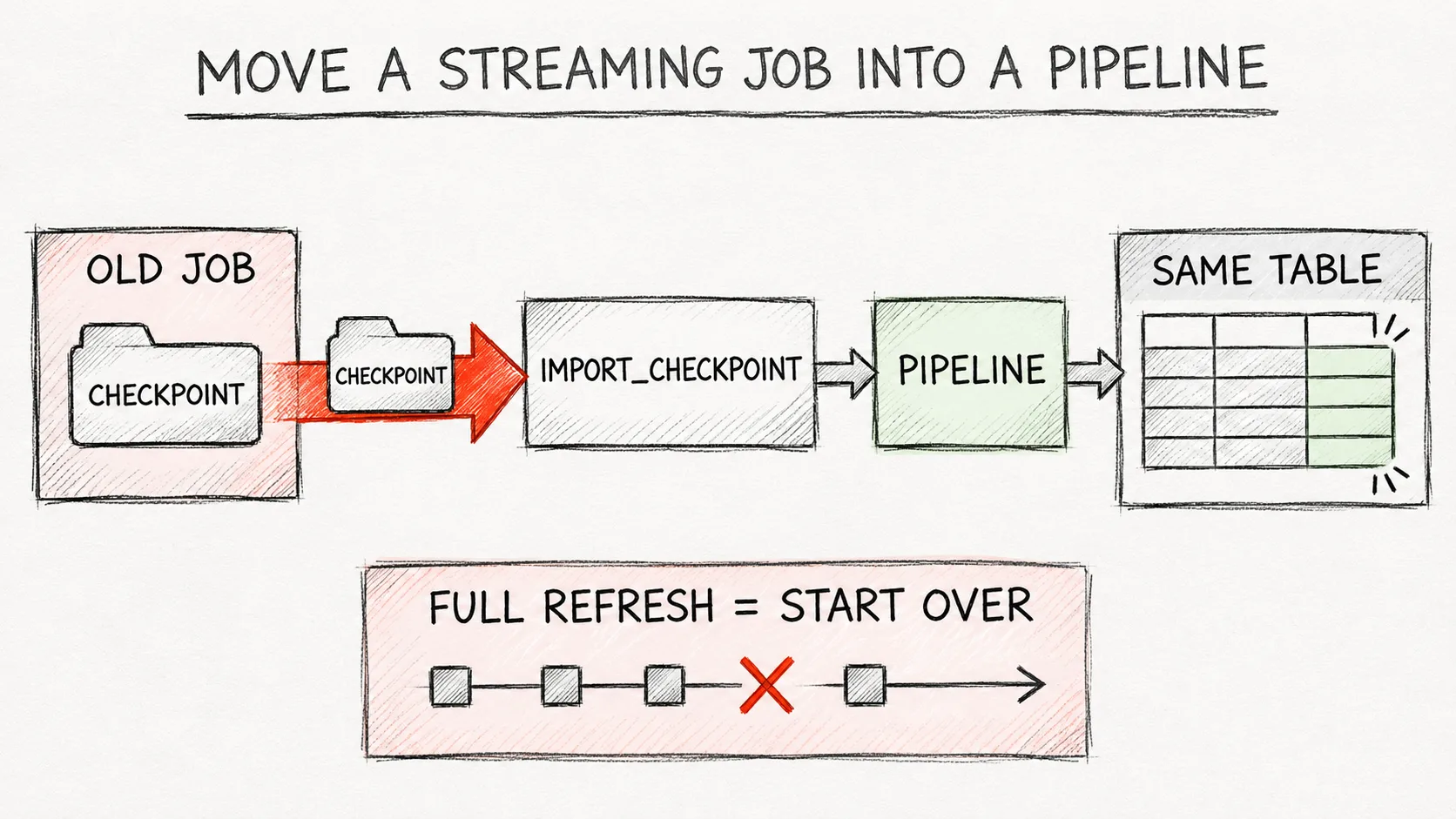
import_checkpoint (Beta, since Sep 10, 2026) moves a Structured Streaming query into a Lakeflow pipeline together with its offsets and state, so the pipeline does not reprocess the source from the beginning. In my lab the pipeline also took over the old job’s table, and deduplication remembered the keys from before the migration. A full refresh, however, starts from an empty checkpoint and reads the source again, so with a short-retention source the history disappears from the table.The problem
Many projects have Structured Streaming jobs that have been running for years: readStream, a few transformations, writeStream with a checkpoint. Moving such a job into a Lakeflow pipeline (in the docs: Spark Declarative Pipelines on Lakeflow) usually meant a new streaming table and reprocessing the source from the start. With Kafka and 7-day retention part of the data is already gone, and with a large Delta table a full recompute costs money.
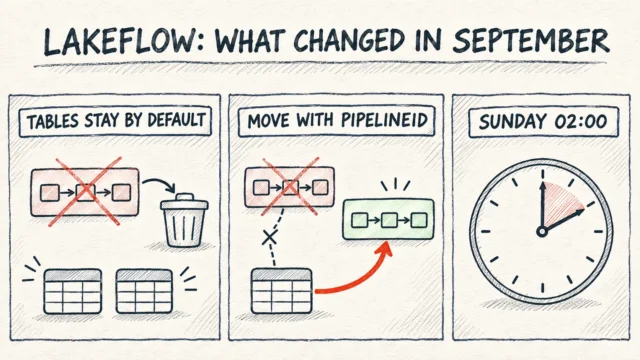
In September two Beta features changed that: dp.create_table(), a plain managed table in a pipeline, and the import_checkpoint parameter of @dp.append_flow, which points at the old query's checkpoint. I covered the other September Lakeflow changes in Lakeflow, September 2026: deleting a pipeline keeps its tables, and here I test the checkpoint import on a stateful query.
How it works
dp.create_table() creates a managed table in the pipeline (not a streaming table) that one or more @dp.append_flow flows write to. The SQL equivalent is CREATE TABLE ... FLOW. The module in 2026 is from pyspark import pipelines as dp.
import_checkpoint points at the checkpointLocation the old query used (a cloud path, a UC volume or DBFS). According to the docs, on the first update the pipeline clones that checkpoint into its own storage and resumes from the last committed offset, together with the state (aggregations, deduplication keys, watermarks). The original checkpoint is left untouched, so we can go back to the old job.
It is worth adding that the docs changed on November 2. Before, the flow had to write to a new table; now the example carries the comment "Use the existing table your Structured Streaming query writes to; create_table adopts it". That is the variant I tested in the lab: the pipeline gets the same table the old job wrote to.
Limitations from the docs:
- The checkpoint is imported only once, on the first update. To import a different checkpoint you need a new flow name, because changing the path in an existing flow does nothing and raises no error.
- A full refresh does not re-import the checkpoint. It starts from an empty checkpoint and reprocesses the source from the beginning.
import_checkpointworks only withappend_flow, andcreate_tabletables do not support AUTO CDC.- The old query has to be stopped before the pipeline runs. If both write at the same time, both process the same offsets and we get duplicates.
Keep the source and the query the same. For stateful queries the usual Structured Streaming checkpoint rules apply: the docs do not allow changes to stateful operations between restarts, and dropDuplicates() may fail to start after a change of compute access mode (only dedicated ↔ no isolation and standard ↔ serverless are allowed). That these rules also apply to import_checkpoint is my inference, because the pipeline resumes the cloned checkpoint with its state. In the lab the old job ran on serverless, like the pipeline.
Step by step
The notebook creates a source table ckpt_source with 5 orders and a volume for the checkpoint (CKPT). api is WorkspaceClient().api_client, ORDERS is a SELECT from ckpt_orders sorted by id, and wait waits for a pipeline update to finish.
First the old job: a plain Structured Streaming query that deduplicates by id, run once (availableNow). Then 4 orders arrive in the source: 3 new ones and id 3 again.
ⓘ According to the docs it works on Free Edition, I have not tested it.
(spark.readStream.table("ckpt_source")
    .dropDuplicates(["id"])
    .writeStream
    .option("checkpointLocation", CKPT)
    .trigger(availableNow=True)
    .toTable("ckpt_orders")
    .awaitTermination())
spark.sql("INSERT INTO ckpt_source VALUES (3, 'DE', 200.00), (6, 'PL', 10.00), (7, 'CZ', 20.00), (8, 'DE', 30.00)")
display(spark.sql(ORDERS))
ckpt_orders has 5 rows with ids 1–5. Now the pipeline. The code goes into a workspace file: dp.create_table points at the old job's table, import_checkpoint at its checkpoint, and the query stays the same:
◆ Requires a full (Premium) workspace, Beta feature.
migration_code = f'''
from pyspark import pipelines as dp

dp.create_table("ckpt_orders")

@dp.append_flow(target="ckpt_orders", import_checkpoint="{CKPT}")
def migrate_orders():
    return spark.readStream.table("ckpt_source").dropDuplicates(["id"])
'''
path = f"{SRC}/news104_ckpt.py"
api.do("POST", "/api/2.0/workspace/import", body={"path": path, "format": "AUTO", "overwrite": True,
                                                  "content": base64.b64encode(migration_code.encode()).decode()})
pid = api.do("POST", "/api/2.0/pipelines", body={"name": "news104_ckpt", "catalog": catalog, "schema": schema,
    "serverless": True, "development": True, "libraries": [{"file": {"path": path}}]})["pipeline_id"]
print("news104_ckpt:", wait(pid, api.do("POST", f"/api/2.0/pipelines/{pid}/updates", body={})["update_id"]))
display(spark.sql(ORDERS))
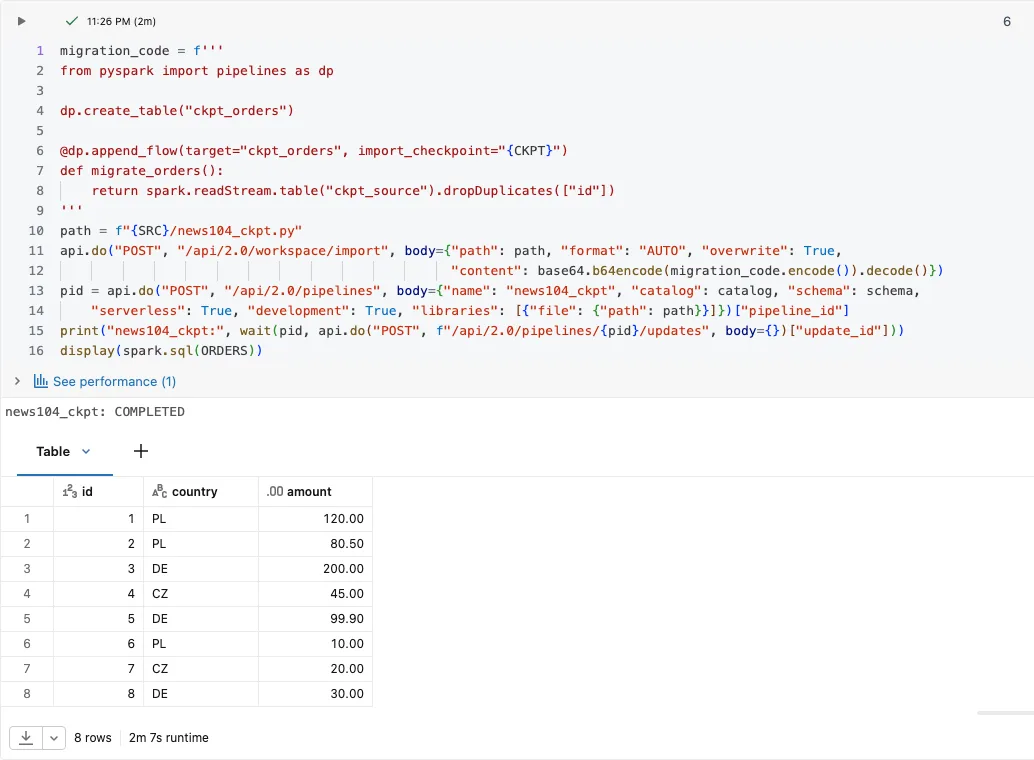
Lab result: the update ends COMPLETED and ckpt_orders has 8 rows: the 5 old ones and 3 new ones. Id 3 appears once, so the pipeline remembered the deduplication keys from the old checkpoint. If the state had not come along, id 3 would be in the table twice, and if the offsets had not come along, the pipeline would have read the source from the beginning. During the update Catalog Explorer shows the pipeline's status on the old job's table, and the pipeline reports 3 output records for the flow: of the 4 new rows, the repeated id 3 was dropped.
The last step tests a full refresh. Sources such as Kafka keep data only for a while, so we simulate that by deleting the old orders from the source:
◆ Requires a full (Premium) workspace, Beta feature.
spark.sql("DELETE FROM ckpt_source WHERE id <= 5")
upd = api.do("POST", f"/api/2.0/pipelines/{pid}/updates", body={"full_refresh": True})["update_id"]
print("news104_ckpt full refresh:", wait(pid, upd))
display(spark.sql(ORDERS))
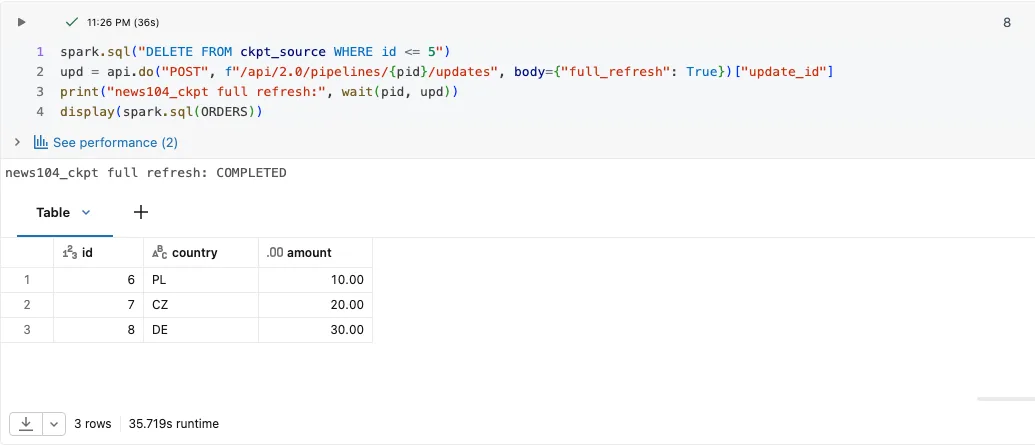
Lab result: after the full refresh ckpt_orders has only 3 rows (ids 6–8). The pipeline cleared the table, started from an empty checkpoint and read what was in the source, so the 5 orders from before the migration are gone from the table.
Code for this article on GitHub →notebook and a step-by-step README · lakeflow-import-checkpoint
I ran the notebook as an admin in an Azure Databricks Premium (trial) workspace, so I did not work out the minimum privileges. The pipeline's run-as identity has to read the old job's checkpoint, so that is the first permission to check.
Pitfalls
- A full refresh after the migration reprocesses the source. With a short-retention source the history disappears from the table, as in the lab: 8 rows became 3. With a source that still has everything, we get exactly the full recompute we wanted to avoid. So decide who is allowed to run a full refresh of this pipeline.
- Changing the
import_checkpointpath in an existing flow does nothing and raises no error. A second import needs a new flow name. - The old job has to be stopped before the pipeline starts. If it keeps running, both write to the same table and we get duplicates. My inference: the pipeline repeats an interrupted last batch, so stop the job after a committed batch.
- In a bundle, keep the checkpoint path in a variable set only for prod; otherwise a deploy to dev clones the production checkpoint.
- It is a Beta and a one-time migration, so it needs a plan: when we stop the old job, how we go back to it (its checkpoint stays untouched) and what we do if the first update fails.
When NOT to use it
- When the old job processes a small source in a few minutes. In that case a full recompute in the new pipeline is simpler and needs no Beta.
- When the target has to be a streaming table with AUTO CDC.
create_tabletables support onlyappend_flow. - When the migration also changes the logic of a stateful query (operators, keys). Migrate 1:1 first, change later.
Summary
dp.create_table+@dp.append_flow(import_checkpoint=...)moves a Structured Streaming job into a pipeline without reprocessing the source. In the lab the pipeline took over the old job's table and its deduplication state.- The import happens only on the first update, and a full refresh starts from scratch and, with a short-retention source, loses history.
Want more posts? Follow along via RSS or on LinkedIn.
Comments
Quiet on the trail so far. Be the first to comment.