
 Krzysztof Burejza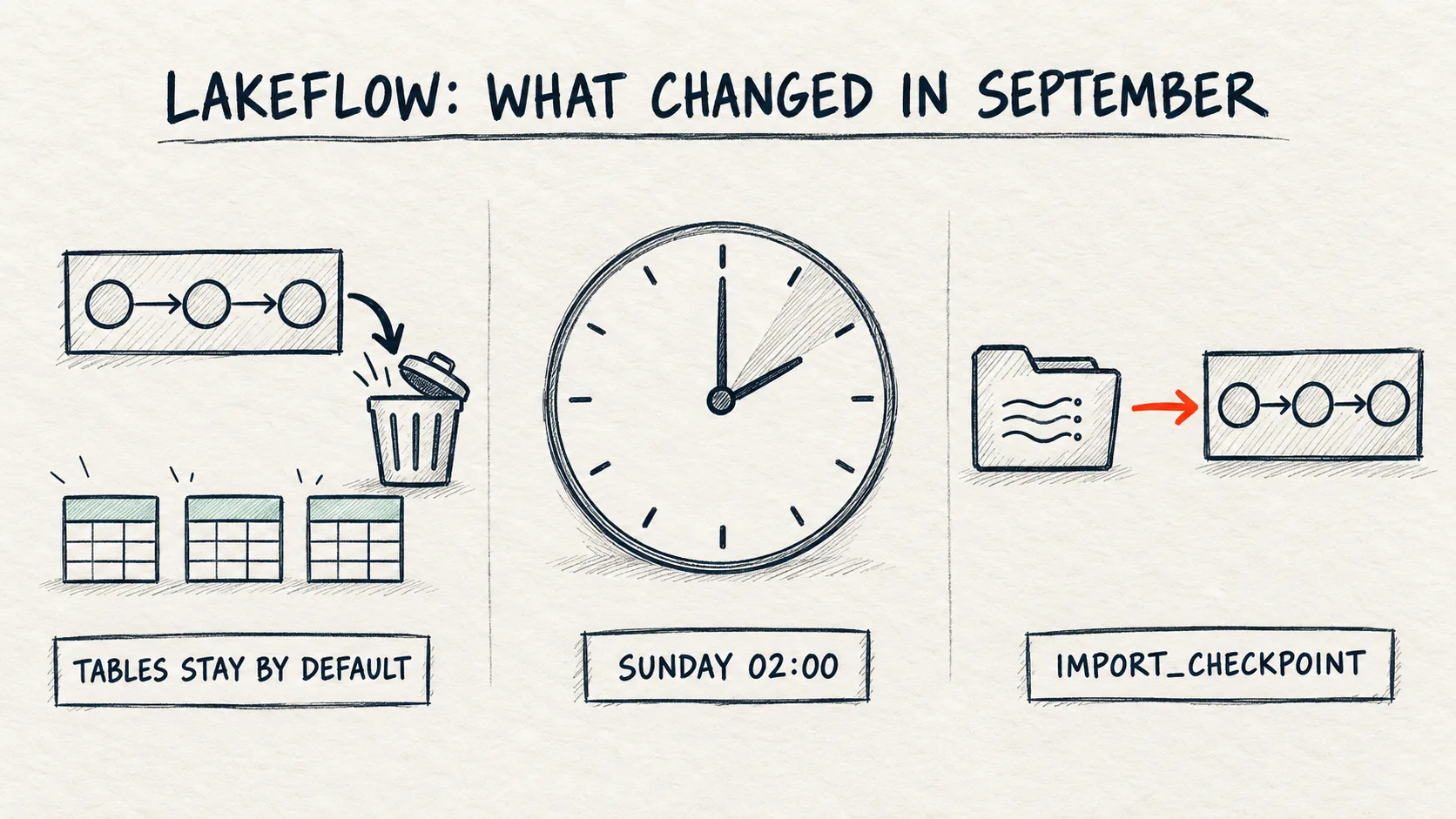
cascade explicitly: true in dev and test, false in production. September also brought maintenance windows for continuous jobs and, in Beta, import_checkpoint, which moves a Structured Streaming job into a pipeline without reprocessing the source.The problem
Most release notes are about what we can write in code. These three changes to Lakeflow pipelines (Spark Declarative Pipelines on Lakeflow in the docs) are about how pipelines live in production: how we delete them, when they restart, and how we migrate into them.
The first one changes a default behaviour. Until now, deleting a Unity Catalog pipeline also dropped its materialized views and streaming tables. From September 25, 2026 the tables stay by default. If a CI/CD job or a test environment cleans up by deleting the pipeline, after that date it leaves tables and data in the catalog, and we keep paying for the storage.
How it works
1. Deleting a pipeline keeps its tables (Sep 25, 2026, behaviour change)
Per the docs: when you delete a Unity Catalog pipeline that uses the default publishing mode, its materialized views, streaming tables and views are retained. This applies to the Delete button in the UI and to DELETE in the Pipelines API. The retained tables can still be queried, but they can't be updated until they are moved into an active pipeline.
What to know:
- The old behaviour is one flag away:
http
  DELETE /api/2.0/pipelines/{pipeline_id}?cascade=true
Needs a full (Premium) workspace with Unity Catalog. The flag existed before; on Sep 25 only its default changed.
- Hive metastore pipelines are not affected and behave as before.
- Publishing mode: check the Summary field in pipeline settings, or
effective_publishing_mode=DEFAULT_PUBLISHING_MODEinGET /api/2.0/pipelines/{pipeline_id}. On the lab a freshly created pipeline returned exactlyDEFAULT_PUBLISHING_MODE. Pipelines created before February 5, 2025 may still use the legacyLIVEschema mode. - Per the docs, orphaned tables are moved into an active pipeline. The release note points to the "Move tables between pipelines" page, which reassigns a table through the
pipelines.pipelineIdproperty:
sql
  ALTER STREAMING TABLE sales
    SET TBLPROPERTIES("pipelines.pipelineId"="<destination-pipeline-id>");
Needs a full (Premium) workspace and Databricks Runtime 16.3+ for the ALTER. You must be the run-as identity and the owner of both pipelines. Then add the table definition to the destination pipeline's code. I didn't test this step on the lab, and the page describes a move between two existing pipelines, while here the source one is gone. It also only mentions a user or a service principal as the run-as identity, not a group. More in Lakeflow: a pipeline that doesn't belong to one person.
I checked it on the lab. The notebook deletes pipeline news104_a with a plain DELETE, waits 20 s, then shows which news104_* pipelines are left, the tables in the schema (TABLES is a query on information_schema.tables limited to the notebook's objects) and the row counts of the A tables. api is WorkspaceClient().api_client, and pid_a and pid_b are the pipeline IDs from step 1. The notebook's create_pipeline writes the code to a workspace file, creates the pipeline and starts an update, and wait polls until it ends.
api.do("DELETE", f"/api/2.0/pipelines/{pid_a}")
time.sleep(20)
left = api.do("GET", "/api/2.0/pipelines", query={"filter": "name LIKE 'news104_%'"}).get("statuses", [])
print("news104_* pipelines:", sorted(p["name"] for p in left))
display(spark.sql(TABLES))
# the tables of the deleted pipeline A can still be read
display(spark.sql("""SELECT (SELECT COUNT(*) FROM a_orders) AS a_orders_rows,
  (SELECT COUNT(*) FROM a_total_by_country) AS a_total_by_country_rows"""))
Needs a full (Premium) workspace with Unity Catalog.
The pipeline is gone from the list, but its streaming table and materialized view stay in the schema and can still be read (5 and 3 rows).
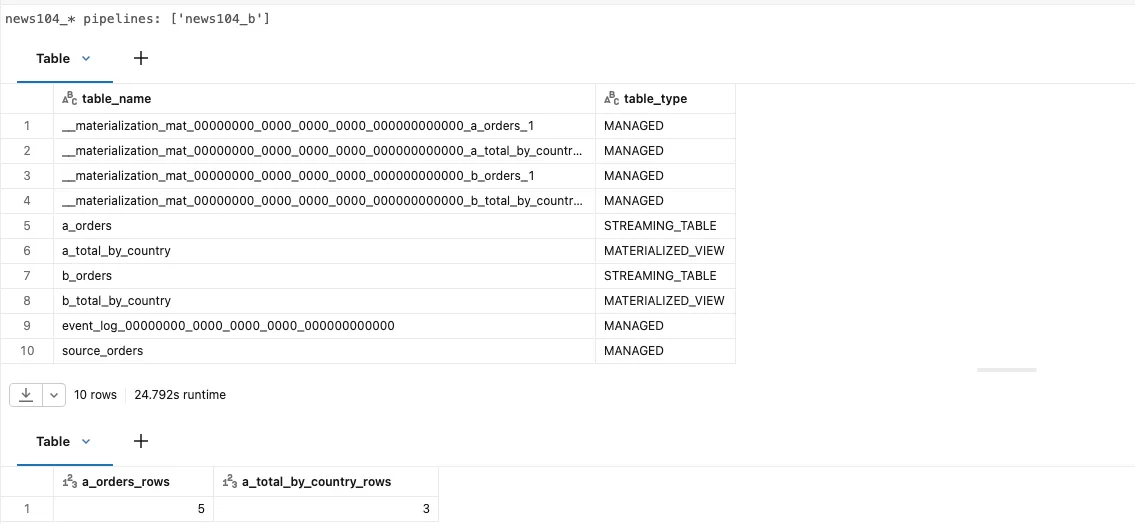
Lab result: after DELETE /api/2.0/pipelines/{id} without the flag only news104_b is left in the pipeline list, while a_orders and a_total_by_country are still in information_schema.tables. Only one of the two event_log_* tables went away.
Pipeline news104_b is deleted the same way, only with cascade=true:
api.do("DELETE", f"/api/2.0/pipelines/{pid_b}", query={"cascade": "true"})
time.sleep(20)
display(spark.sql(TABLES))
Needs a full (Premium) workspace with Unity Catalog.
With cascade=true, pipeline news104_b took b_orders, b_total_by_country and its event log with it.
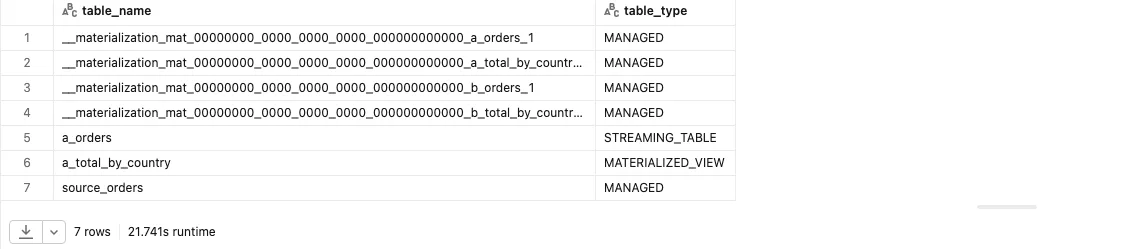
Lab result: after DELETE ...?cascade=true the b_* tables are gone, but the internal __materialization_mat_*_b_* tables are still listed 20 s after the delete (more in Gotchas).
Deleting a pipeline in CI/CD
In production the new default is the safer one: deleting a pipeline by mistake no longer drops the data. In ephemeral environments (dev, test, per-branch) it's the other way round: the tables stay in the catalog, take storage, and someone may build a report on a table that will never refresh again. So decide on cascade per environment and always pass it explicitly.
- REST, CLI and SDK. The REST API reference ("By default, this parameter will be true"),
databricks pipelines delete --help(checked in CLI 1.16.1 and in the v1.21.0 source) and the Python SDK docstring still describe the old behaviour. Don't rely on the default: in dev and test use?cascade=true,databricks pipelines delete <id> --cascadeorw.pipelines.delete(pipeline_id, cascade=True), and in production an explicitfalse. - Bundles. In Declarative Automation Bundles (formerly Databricks Asset Bundles) the pipeline resource has a
cascade_on_destroyfield (Databricks CLI 1.12.0+, direct engine, which is the only bundle engine since CLI 1.20.0). If it's unset, the server default applies, so the tables stay. Set it per target:devandtesttotrue,prodexplicitly tofalse, and on prod you can addlifecycle.prevent_destroy: true. Three more things follow from the CLI source; I didn't test them on the lab. The CLI readscascade_on_destroyfrom the last deploy state, so after adding the field runbundle deployfirst and only thenbundle destroy. Without the field,bundle destroy(as of v1.21.0) asks to delete the pipelines "along with the Streaming Tables (STs) and Materialized Views (MVs) managed by them", but sendsDELETEwithoutcascade. And abundle deploythat recreates the pipeline (for example after changingcatalogorstorage) also leaves the old tables behind, although the CLI message promises a full refresh, so review such changes inbundle planfirst. - Terraform. The Terraform provider (v1.137.0) has no equivalent of
cascade_on_destroyand deletes the pipeline withoutcascade, soterraform destroyleaves the tables. Bundles on CLI 1.19 and older with the terraform engine behave the same. Clean up with an explicitDROPthere. - Redeploying with the same names. A new pipeline will hit the orphaned tables. On the lab I only tested
DROP(the A tables in the cleanup step), and that's the safe path. Per the docs, reassigning throughpipelines.pipelineIdassumes an existing source pipeline, and I didn't test which error a deploy onto taken names ends with. - Owner of orphaned tables. I expect it to stay the identity that was the pipeline's run-as, so with a group as run-as the tables would belong to the group, not to you. I also expect the table to keep
pipelines.pipelineId, so you can find orphaned tables by comparing that property with the list of existing pipelines. The docs don't describe this, and I didn't check it on the lab.
2. Maintenance windows for continuous jobs (Sep 10, 2026; Azure Sep 15, 2026)
A continuous pipeline never finishes, so Databricks can't wait for the end of a run to apply a runtime upgrade or serverless infrastructure maintenance. It restarts it instead: it starts a new update on a fresh cluster, shuts down the old one, and the new update resumes from the checkpoint. Until now that could happen at any time. Now we can pick a window: a day of the week, a start hour (0–23) and a time zone (a Java time zone ID such as Europe/Warsaw). Maintenance only starts within one hour from the window start.
The window is a setting on the continuous job that runs the pipeline. In the UI it's in Jobs (Continuous trigger → Advanced → Maintenance window) or in the pipeline (Schedule → Advanced settings → Maintenance window). In the Jobs API it's maintenance_window inside continuous:
{
  "continuous": {
    "pause_status": "UNPAUSED",
    "maintenance_window": {
      "start_hour": 2,
      "day_of_week": "SUNDAY",
      "timezone_id": "Europe/Warsaw"
    }
  }
}
Needs a full (Premium) workspace. All three fields are required. This is a fragment of the job settings (the pipeline_task is in the notebook). With UNPAUSED the job starts right away and runs non-stop, so use PAUSED to try it.
On the lab, Jobs API 2.2 accepted such a job with pause_status: PAUSED and a pipeline task, and jobs/get returned the window unchanged. The job was paused and deleted straight away, so I did not observe an actual restart inside the window.

Lab result: the continuous block read back from jobs/get contains maintenance_window with the same three fields we sent to jobs/create.
Watch out for:
- Serverless clusters have a maximum lifetime. If it's reached before the next window, Databricks restarts the pipeline outside the window anyway. The maintenance windows page doesn't say how long that limit is. The pipeline release notes from January 2026 mention continuous pipelines restarting after 7 days with the
INFRASTRUCTURE_MAINTENANCEcause, but not whether that's the same limit. - Daylight saving time. The window follows the configured zone, so on the day the clocks change it can shift by up to an hour.
- Notifications. The job can send Maintenance start and Maintenance complete events (email, Slack, Teams, PagerDuty). The second one includes the restart duration and the pipeline status afterwards.
- It only exists for continuous jobs (including those that run a pipeline). Scheduled or other triggers don't have this setting.
- A continuous pipeline without a job. The docs only describe the window on a continuous job. A pipeline started by such a job is itself triggered; the job is what keeps it running. For a pipeline with
continuous: truein its own settings I found no window in the docs. - The window in IaC. In bundles it's
resources.jobs.<job>.continuous.maintenance_window(CLI 1.16.0+), and per the CLI 1.21.0 schema alsotriggers[].continuous.maintenance_window, in Beta. The legacycontinuousfield can't go together withtriggers(Lakeflow Jobs: multiple triggers on one job), and I didn't test thetriggersvariant. The Terraform provider doesn't have this field, so a window set by hand in the UI won't end up in code.
3. Managed tables in pipelines and import_checkpoint (Sep 10, 2026, Beta)
dp.create_table() creates a plain managed table in a pipeline (not a streaming table), written by one or more @dp.append_flow flows. The SQL equivalent is CREATE TABLE ... FLOW. The Python module in 2026 is from pyspark import pipelines as dp.
The import_checkpoint parameter of @dp.append_flow points at the checkpointLocation of an existing Structured Streaming query (cloud storage, a UC volume or DBFS). On the first update the pipeline clones that checkpoint into its own storage and resumes from the last committed offset, with state intact (aggregations, dedup keys, watermarks). The original checkpoint is not modified.
In the notebook the pipeline code sits in the migration_code variable, and CKPT is the volume with the checkpoint of a plain Structured Streaming query that wrote ss_orders earlier. The same cell creates the pipeline, waits for the update and compares the two tables:
migration_code = f'''
from pyspark import pipelines as dp

dp.create_table("c_orders")

@dp.append_flow(
    target="c_orders",
    import_checkpoint="{CKPT}/ss_orders",
)
def migrate_orders():
    return spark.readStream.table("source_orders")
'''
pid_c, upd_c = create_pipeline("news104_c", migration_code)
t0 = time.time()
print("news104_c:", wait(pid_c, upd_c), f"after {time.time() - t0:.0f} s")
# if the checkpoint was taken over, c_orders has only the 3 new rows (ids 6-8)
display(spark.sql("""SELECT 'ss_orders' AS table_name, COUNT(*) AS row_count, MIN(id) AS min_id, MAX(id) AS max_id FROM ss_orders
  UNION ALL SELECT 'c_orders', COUNT(*), MIN(id), MAX(id) FROM c_orders"""))
Needs a full (Premium) workspace with Unity Catalog. Beta.
On the lab the Beta worked on the first try: pipeline news104_c finished its update as COMPLETED after 62 s and picked up the checkpoint of a plain Structured Streaming query.
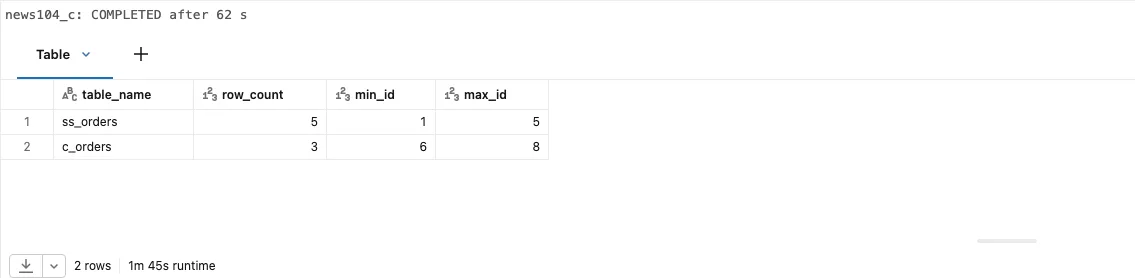
Lab result: ss_orders (the old job) has 5 rows with ids 1–5, and c_orders only 3 rows with ids 6–8, so the pipeline resumed from the checkpoint offset instead of reprocessing the source.
Limits from the docs to know before migrating:
- The flow must write to a new table created with
create_table, or to a sink. Importing into an existing table (for example the old job's target) is not supported, andcreate_tablewon't adopt an existing table. - The checkpoint is imported once, on the first update. A full refresh does not re-import it. It starts from an empty checkpoint and reprocesses the source.
- To import a different checkpoint you need a new flow name. Changing only the
import_checkpointpath of an existing flow does nothing and raises no error. - The source has to be the same. For stateful queries (aggregations, deduplication) the usual Structured Streaming checkpoint rules apply: the docs don't allow changes to stateful operations between restarts, so we keep the same operators and keys. On top of that,
dropDuplicates()anddropDuplicatesWithinWatermark()can fail to restart after a change of compute access mode. Only dedicated ↔ no isolation and standard ↔ serverless are allowed, so a job moved from a dedicated cluster to a serverless pipeline falls outside them. That these rules also coverimport_checkpointis my own conclusion (the pipeline resumes the cloned checkpoint together with its state). On the lab I only tested a stateless query. - Managed tables in pipelines support only
append_flow: no AUTO CDC, no replace flows. - Stop the old job cleanly, after its last batch is committed, and only then run the pipeline. If both write at the same time or the last batch is interrupted, both process the same offsets, the same rows land in both tables, and reading both gives duplicates.
Step by step: the lab demo
The notebook lakeflow_september_2026.py does everything through the REST API from the notebook, on serverless. It writes the pipeline code to workspace files itself. I ran it with my admin account on a new Azure Databricks Premium (trial) workspace. Without admin rights you need USE CATALOG, permission to create a schema (or tables, materialized views and a volume in an existing one), and permission to create pipelines and jobs. The notebook, step by step:
- Creates a source table
source_orders(5 rows) and two tiny serverless pipelines,news104_aandnews104_b, each with a streaming table*_ordersand a materialized view*_total_by_country. - Deletes
news104_awith a plainDELETEand listsinformation_schema.tablesplusSELECT COUNT(*)from its tables. - Tries
REFRESHon the orphaned tables. - Deletes
news104_bwithcascade=trueand lists the tables again. - Runs a plain Structured Streaming query (
trigger(availableNow=True)) with a checkpoint in a volume, then appends 3 new rows to the source. - Creates pipeline
news104_cwith the code from section 3 (import_checkpoint) and compares the tables. - Creates a job with a
continuoustrigger inPAUSEDstate and amaintenance_window, reads its settings back and deletes it straight away. Nothing runs continuously. - Cleans up: pipelines with
cascade=true, tables, the checkpoint volume, the pipeline source files.
Lab results:
news104_aandnews104_bstarted in parallel and both reachedCOMPLETEDafter 62 s. Pipelinenews104_cwithimport_checkpointalso took 62 s. The whole notebook took about 5 minutes, 40 s of which is a pause the recorder adds in step 6 so the video has time to show the pipeline in the UI.- After deleting
news104_awithoutcascade,a_orders(STREAMING_TABLE) anda_total_by_country(MATERIALIZED_VIEW) stayed ininformation_schema.tablesand could be queried: 5 and 3 rows. REFRESHfailed with a compute error (MV_NOT_ENABLED_ON_SERVERLESS_GENERIC_COMPUTE,ST_NOT_ENABLED_…), not with a message about an orphaned table. Details in Gotchas.- After deleting
news104_bwithcascade=true,b_ordersandb_total_by_countrywere gone. c_ordersholds only the 3 new rows (ids 6–8); the 5 old ones stayed inss_orders.- The
PAUSEDcontinuous job withmaintenance_windowwas created, read back and deleted without errors. - During cleanup,
cascade=trueonnews104_calso removedc_orders, the managed table created bydp.create_table.
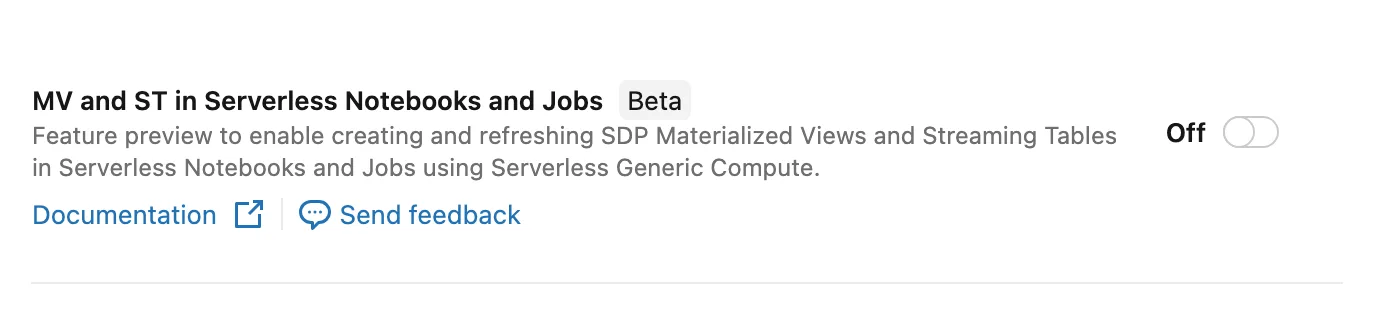
Previews page of the lab workspace (2026-10-15): the toggle is Off, as it was during the recording. Per the preview's description it enables creating and refreshing MVs and STs on serverless in notebooks and jobs, so it should remove the MV_NOT_ENABLED_ON_SERVERLESS_GENERIC_COMPUTE error.
Gotchas
- An orphaned table looks alive. It can still be read, so the dashboard keeps working while the data stands still. A query that compares the tables'
pipelines.pipelineIdwith the list of existing pipelines helps. import_checkpointdoes not move data, and a full refresh can duplicate it. The new table starts from the checkpoint's offset, so history stays in the old table. You can load it with aonce=Trueflow (INSERT INTO ONCEin SQL) that reads the old table (ss_orders), not the source, or read both tables. I didn't test the backfill. A full refresh clears the target table, runs the backfill again and reprocesses the source from scratch, because the checkpoint is not imported a second time, so the history lands in the table twice. With a short-retention source (Kafka, for example) some data may be gone altogether.- Beta.
create_tableandimport_checkpointare Beta.import_checkpointis a one-off migration, so it needs a plan: when consumers switch to the new table, how you go back to the old job (its checkpoint stays untouched) and how you block a full refresh.create_tablestays in your code for good, so it's a longer-term decision. In a bundle, keep the checkpoint path in a variable set only for prod, otherwise a dev deploy clones the production checkpoint, and the pipeline's run-as needs read access to that path. REFRESHfrom a serverless notebook may not work at all. On the lab (2026-10-15) I gotMV_NOT_ENABLED_ON_SERVERLESS_GENERIC_COMPUTEandST_NOT_ENABLED_ON_SERVERLESS_GENERIC_COMPUTE: a compute error, not a message that the table is orphaned. Per the preview's description this error should go away once you enable "MV and ST in Serverless Notebooks and Jobs" (Beta, off in my lab). I didn't test that, and the error docs say a streaming table created by a pipeline isn't refreshed outside the pipeline (REFRESH_DELTA_LIVE_TABLE). To check whether a table left by a deleted pipeline is "dead", look atpipelines.pipelineIdin the table properties or at the pipeline in Catalog Explorer, not at the result ofREFRESH.cascade=truedoesn't clean up everything right away. After deletingnews104_bwithcascade=truetheb_*tables were gone, but the internal__materialization_mat_*_b_*tables were still ininformation_schema.tables20 s later and at the end of the notebook, over 2 minutes later. The same happened to__materialization_mat_*_a_*after an explicitDROPof the A tables. I didn't check whether they disappear later on their own. If a script compares the table list in a schema, prepare it for this.- The event log goes with the pipeline. After a plain
DELETEof pipeline A, one of the twoevent_log_*tables was left, so A's event log was gone even though its MV and ST stayed. If you need the event log for audit, copy it before deleting the pipeline, or copy it on a schedule. - A serverless pipeline update takes about a minute. The simplest update (5 rows, one ST and one MV) took 62 s on the lab (32 s in the run-as group post). In integration tests that create and delete pipelines, that adds up quickly.
When not to use it
import_checkpointwhen the old job processes a small source in a few minutes anyway. A full reprocess in the new pipeline is simpler and doesn't need a Beta feature.import_checkpointwhen the target should be a streaming table with AUTO CDC. Managed tables in pipelines only supportappend_flow.- Maintenance windows when the pipeline doesn't need to run 24/7. A triggered pipeline on a schedule doesn't have this setting at all.
- The default delete behaviour in ephemeral environments. Pass
cascade=trueexplicitly there from day one. cascade=truein production. An explicitfalsethere protects the data from an accidental pipeline delete.import_checkpointwhen the migration also changes the logic of a stateful query (operators, keys). Migrate 1:1 first, change later.
See it run
A recording of the whole run of the English notebook on the lab (serverless), from creating pipelines A and B to cleanup, with English step captions at the bottom and background music. In step 6 the video switches twice to the news104_c pipeline page in the UI: once while the update runs and once after it finished (graph, owner, run as, 3 records in c_orders). Waiting for compute and for the pipeline updates is sped up 8×. In the copy of the notebook used for the recording, step 6 has an extra time.sleep(40) line so the video has time to show the pipeline, and the catalog widget is set to dataistheway instead of the default workspace. Otherwise the code is the same as in the notebook on GitHub.
Code for this article on GitHub →notebook and a step-by-step README · lakeflow-september-2026
Summary
- Since Sep 25, 2026, deleting a UC pipeline keeps its tables. The old behaviour:
DELETE /api/2.0/pipelines/{id}?cascade=true. In CI/CD passcascadeexplicitly and per environment, because the REST, CLI and SDK help still describes the old default. - Per the docs, retained tables are read-only until you move them into an active pipeline (
pipelines.pipelineId). I didn't test adopting an orphaned table. - The maintenance window (
continuous.maintenance_window) lives on the job that runs the continuous pipeline. On serverless a restart can still happen outside it. dp.create_table+@dp.append_flow(import_checkpoint=...)(Beta) moves a Structured Streaming job into a pipeline without reprocessing the source, but into a new table and without history.
Want more posts? Follow along via RSS or on LinkedIn.
Comments
Quiet on the trail so far. Be the first to comment.